

What Is Workspace ONE Unified Endpoint Management (UEM)?
Device management made easy!
Omnissa Workspace ONE Unified Endpoint Management (UEM) is a single solution that manages all device types on all platforms in all use cases. It incorporates modern device management, application management, and security to give IT teams control over the highly diversified device deployments found in so many organizations today.

Figure 1: Cloud-native desktop and mobile modern management
Workspace ONE UEM offers the most comprehensive spectrum of controls; it breaks modern management down into 5 areas:
- Onboarding – How do you get the device under management
- Configuration – How do you set the right controls on the device
- OS updates – How do you patch a device from anywhere
- Software – How do you deliver apps to your user’s devices
- Support – How do you handle incident response and remediation.
It’s important to note that security is baked into all these areas. Everything Omnissa does is designed to make the device more secure, while maintaining a best-in-class user experience.
Now that you have a high-level overview of what Workspace ONE UEM can do for you and your organization, read on to learn about the key features and architecture.
Key features
Today's modern workforce expects IT to offer technologies that help them work from anywhere, any time, and on any device. That means IT needs to manage multiple device platforms – whether Windows, MacOS, iOS, Android, Linux, or ChromeOS – and allow access to work and data across all those devices. This makes it challenging for IT to provide a consistent and seamless user experience. Workspace ONE UEM helps meet that challenge.

Figure 2: Key features of Workspace ONE UEM
Unified Endpoint Management
With Workspace ONE UEM, you can manage devices used in the field and even in low-bandwidth environments. You can manage the full lifecycle of any endpoint – mobile (Android, iOS), desktop (Windows, macOS, Chrome OS, Linux), rugged and even IoT – in a single management console.
- Bring your own. Supports every type of device that your end users might use: choose-your-own, corporate-owned, locked down, and more.
- Supports full life-cycle management. Workspace ONE UEM supports full life-cycle management of a wide variety of devices: phones, tablets, Windows, and rugged and special-purpose devices.
- Provides numerous enrollment options. Provides you with a wide variety of enrollment options, including auto-enrollment, QR code enrollment, sideload, in bulk, barcode enrollment, Zebra StageNow, and Honeywell Enterprise Provisioner.
Employee experience & productivity
You can deliver a great employee experience that is consistent on any device, no matter where your end users are located, by combining an easy login experience via Workspace ONE Intelligent Hub with SSO, a self-service unified app catalog, and more.
- Single sign-on. Utilizes certificates to establish trust, providing a password-less, single sign-on (SSO) experience. Your end users login once to the app catalog. Then they don’t have to remember a bunch of credentials or type in the same password every time they access another app.
- Easy login via Intelligent Hub. End users can login to the Intelligent Hub to seamlessly launch the apps they need. And if they try to access an app with confidential data, Workspace ONE Intelligent Hub prompts them to elevate management on their device.
- Self-service access to apps. Provides your end users with self-service access to the apps they need to get their jobs done. The app catalog displays an individualized menu of applications and virtual desktops that each end user is entitled to. They can organize their options and select favorites to customize the catalog for easy use.
Automation & analytics
You can leverage intelligent insights and rule-based automation to optimize the end-user experience, ease the strain on IT, and allow proactive management and security. In addition, Workspace ONE provides visibility across the deployment and key analytics.
- Automatic deployment. Provides automatic deployment or self-service application access for end users.
- Device tracking. Provides you with the ability to track a device in the Workspace ONE UEM console after it is enrolled, and to gather critical data such as system diagnostics, network information, certificates, apps, custom attributes, and more.
- Customizable dashboards. Provides you with the ability to customize dashboards to provide the data that matters most, as well as analytics that help resolve issues that can impact user experience.
- Dynamic policy engines. Provides the ability to set dynamic policies to automate routine processes and minimize manual tasks. For example, configuring a policy to proactively update drivers based on data retrieved during a vulnerability scan, or to optimize firmware settings that improve performance and stability.
- Self-service capabilities. Provides you with the ability to grant self-service capabilities to end users, which reduces support requests. For example, recommending action based on data suggesting a battery is about to fail.
Corporate data & app protection
You can defend against modern security threats with the rich set of customizable controls that Workspace ONE UEM provides. You can address security on multiple fronts by customizing security and compliance policies, conditional access, device posture checks, and more. Workspace ONE UEM offers a comprehensive security approach that encompasses users, endpoints, apps, data, and networks.
- Security settings. Provides you with the ability to configure security settings for both end users and devices that comply with all security requirements while simplifying access at the same time.
- Troubleshooting. When problems arise, you can utilize troubleshooting functionality, such as remote assist or remote logging, to fix issues in real-time.
- Monitoring and supervision. Provides built-in features for system settings, data protection, apps, device controls, and more, that can restrict actions like sharing sensitive data between apps and syncing with unknown devices to prevent data leakage. Corporate-owned devices can be supervised for higher levels of control.
- Certificate lifecycle management. Provides a service that can renew certificates automatically or manually.
- Workspace ONE Tunnel. Encrypts traffic from individual applications on a user’s device to back-end enterprise systems with “least privilege access” through the Omnissa Unified Access Gateway, which proxies and protects the application and data.
Architecture
As an IT administrator, you can use Workspace ONE UEM to handle device enrollment, a customized app catalog, policy enforcement, compliance, integration with email, and more.
In the following diagram, you can see how users and their devices interact with UEM, Access, and Intelligence. The interactions can include events, such as devices getting software updates from cloud-hosted UEM, Access being used to authenticate users, and telemetry from devices being gathered by Intelligence for tracking performance, security, and user experience.
The optional components, AirWatch Cloud Connector and Unified Access Gateway, can be deployed to connect to internal resources such as Active Directory domains, web servers, and other content.
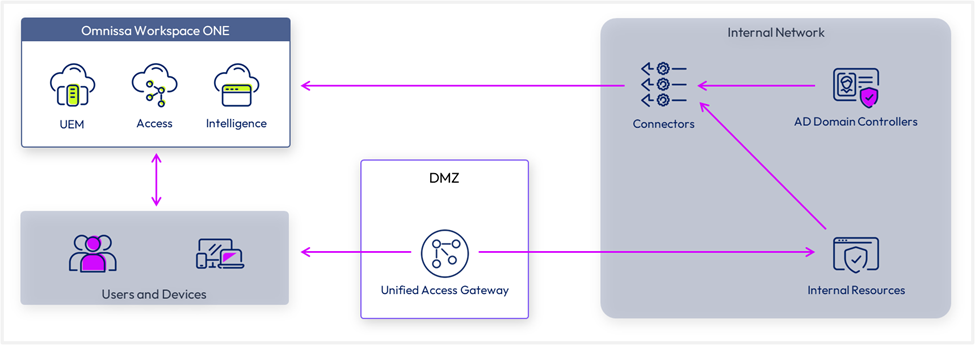
Figure 3: Connectors and the Unified Access Gateway (UAG) are used to securely access internal network resources
Workspace ONE UEM components
The following are key components that make up Workspace ONE UEM.
Provides a friendly and intuitive console where admins can configure policies to manage and monitor devices in your environment. The console is a service that is hosted in the cloud and managed for you as part of the SaaS offering. It provides multi-tenancy, role-based access, profiles, app management options, smart distribution groups, and more.
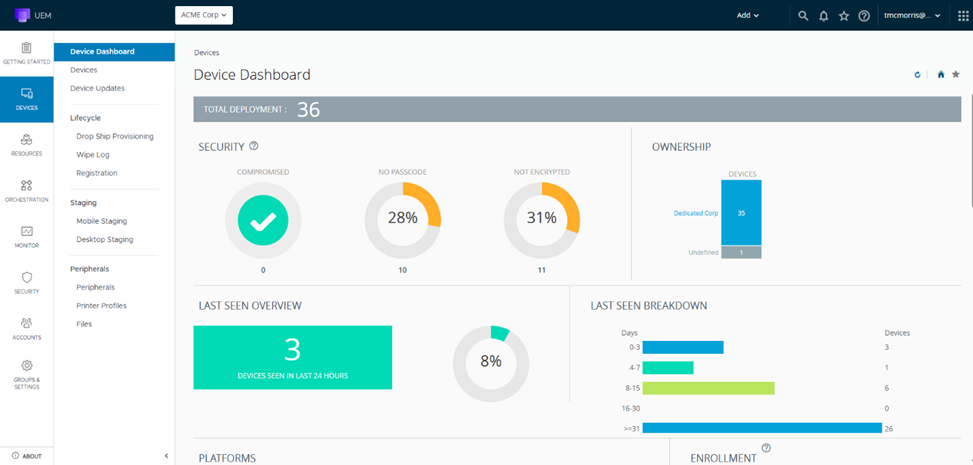
Figure 4: The Workspace ONE UEM administration console
Workspace ONE UEM Device Services
Provides the ability to communicate with all of your managed devices for enrollment, application provisioning, command delivery, and data collection, and hosting the Self-Service portal.
Provides you with the ability to integrate Workspace ONE UEM with your back-end enterprise systems. The AirWatch Cloud Connector runs within the internal network and securely transmits requests from Workspace ONE UEM to your critical infrastructure components. The Cloud Connector integrates with internal components such as email relay, directory services, Exchange email management , Syslog, and more.
Provides a secure and effective method for individual applications to access corporate resources hosted in the internal network. The Tunnel sets up a VPN connection between corporate apps and corporate resources. This provides greater security, especially for apps that contain sensitive data, including encryption, data protection, compliance, and removal of apps when a device is unenrolled.
Provides support for developers creating their own applications to utilize the information in Workspace ONE UEM. You can use these APIs in Workspace ONE to query information, take actions, or create new items, such as applications.
Here are some of the additional members of the Workspace ONE family that interact with Workspace ONE UEM:
Omnissa Access provides a seamless single sign-on (SSO) experience across web, mobile, software-as-a-service (SaaS), and legacy applications. Omnissa Access provides application provisioning, an intuitive app catalog, conditional access controls, directory integration, user authentication, and integration with resources such as Horizon.
A cloud service built for the Workspace ONE platform that provides deep insights into the entire digital workspace, allows smart Unified Endpoint Management (UEM) planning, and delivers powerful automation.
The Workspace ONE Intelligent Hub application allows end users to access enterprise and web apps, stay connected with colleagues, and be productive on any device (Android, iOS, macOS, Windows) from anywhere.
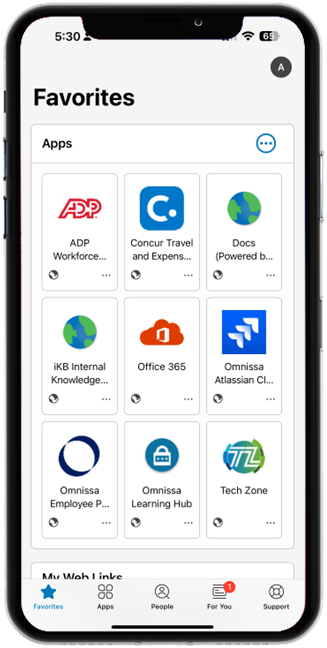
Figure 5: Workspace ONE Intelligent Hub app
Top 5 highlights you should know
Now that you’ve got an idea what Workspace ONE UEM can do, here are the top 5 highlights you should know about Workspace ONE UEM.
- Simplified administration structure
- Single application catalog for all apps
- Manage all endpoints with a single platform
- Comprehensive conditional access
- Integrated data and analytics
Workspace ONE UEM can manage the entire lifecycle of a wide variety of devices, including phones, tablets, Windows, Apple, Android, and rugged devices. UEM supports any device and platform, including corporate-owned hardware and BYOD devices. UEM can automatically deploy applications, provide self-service access for employees, and streamline app deployment and management by automating application upgrades and distribution. In addition, Workspace ONE UEM can ensure that configuration settings for users and devices comply with enterprise security requirements.
Finally, the Workspace ONE family of products includes productivity tools such as an email client, content management tool, and secure mobile web browser. Please visit this resource to learn more about Workspace ONE Productivity Apps.
Learn more about UEM
Here are some great places to learn more about Workspace ONE UEM:
- Workspace ONE UEM product page
- Workspace ONE UEM technical product page
- Workspace ONE UEM architecture
- Workspace ONE UEM configuration
Learn about other Omnissa products
If you are interested in other Omnissa products, see the following introductions: