

What is Omnissa Intelligence?
My very own data lake!
Because employees need the ability to work from anywhere from any endpoint, the boundary around your enterprise is more vulnerable to threats and maintaining a productive employee experience is more difficult than it used to be. How do you monitor every device and provide a secure, yet productive and enjoyable experience for all those users? Are you drowning in data, but unable to make sense of it?
Omnissa Intelligence is a cloud-native service that aggregates telemetry across the digital workspace deployment to provide valuable insights and tools that inform critical decision-making, optimize the end user experience, ensure security and automate remediation and IT processes.
Omnissa Intelligence ingests telemetry from endpoints via Workspace ONE Intelligent Hub, the Horizon agent and integrations with other Omnissa services and third-party systems to provide a complete view of the stability and usability of the digital workspace. IT admins can then:
- Monitor digital workspace metrics that impact user experience and setup automated alerts
- Gather device posture data, such as software and hardware versions, software installed, user location, and Wi-Fi network
- Visualize identity data, such as when a user logs in, which apps and virtual desktops they used, and for how long
- Proactively identify issues, even before the user notices, and remediate automatically
- Make hardware and software procurement decisions based on real data
These tools help optimize end user productivity and engagement. Read on to learn about the key features and architecture of Omnissa Intelligence.
What can Omnissa Intelligence do?
As an IT admin, you need to keep track of various devices and apps for a multitude of users. And you need to understand the status of each device, each application, and each user – all at the same time. For this, you need a strategy.
Traditionally, the strategy was to do all these tasks manually. You manually exported data from your system, loaded it into databases, correlated it, identified issues, and resolved them. You needed visualization tools before you could act on the issues. This was very time-consuming and creates challenges such as:
- Fragmented data sources
- Access issues between data source owners and stakeholders
- Data quality issues
- Long learning curve or runway to turn data into insights and subsequently action
Omnissa Intelligence is a unified analytics platform across physical and virtual endpoint deployments. This Omnissa service brings together telemetry from endpoints, apps, identity, and security into a common data lake – so enterprises have access to the insights needed through a single pane of glass.
Omnissa Intelligence powers use cases across IT operations for UEM and Horizon, serves as the foundation for Workspace ONE Experience Management tools to optimize Digital Employee Experience (DEX), and provides visibility across a broad spectrum of security and compliance risks.
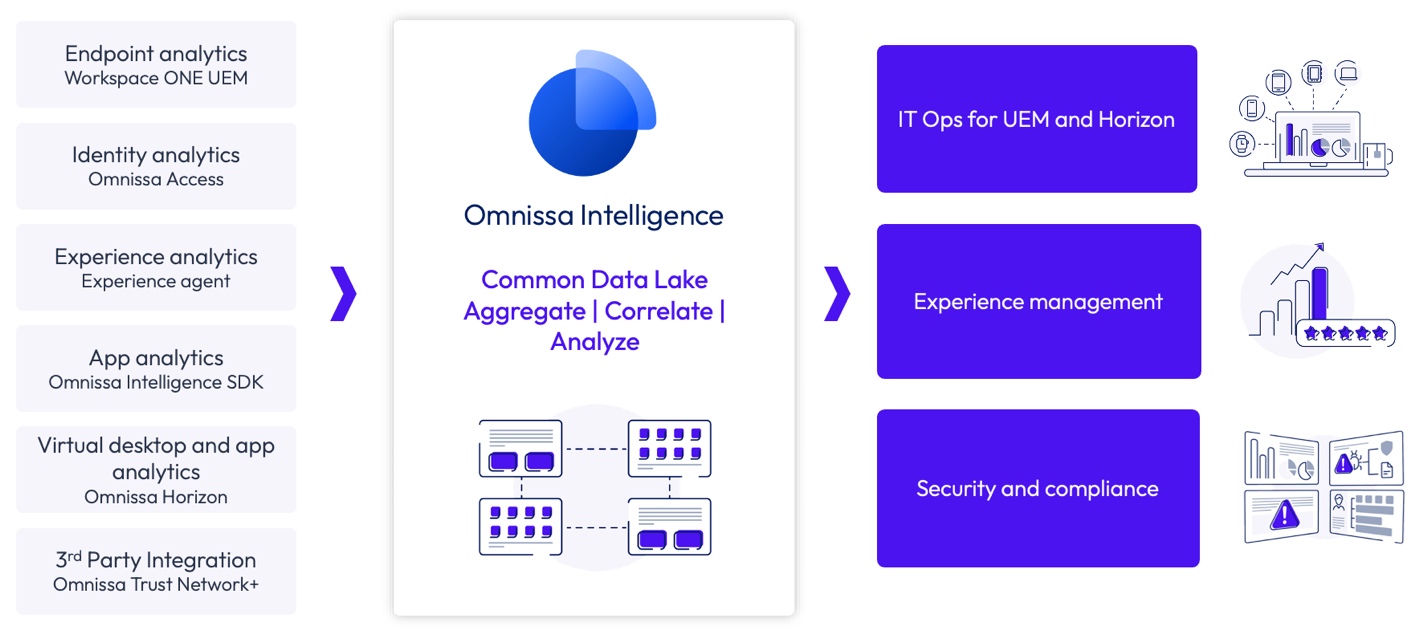
Figure 1: Example Omnissa Intelligence data sources and use cases
In addition, Omnissa Intelligence integrates with a variety of enterprise systems for data ingestion, analysis and automated workflows via out-of-the-box connectors, custom connectors and API integration. For example, automatically create ITSM or procurement tickets when device errors occur, or ingest data from endpoint detection and response (EDR) and mobile threat defense (MTD) solutions to gain insights into risks across the device deployment. This ecosystem powers even deeper insights into security and employee experience as well as facilitates operational IT workflows beyond Omnissa products.
Use Omnissa Intelligence to aggregate data from a variety of sources, correlate the data for risk-based analysis and Digital Employee Experience (or DEX) management, and automate proactive resolutions based on insights gained from rich visualizations, resulting in smarter decisions and faster remediations.
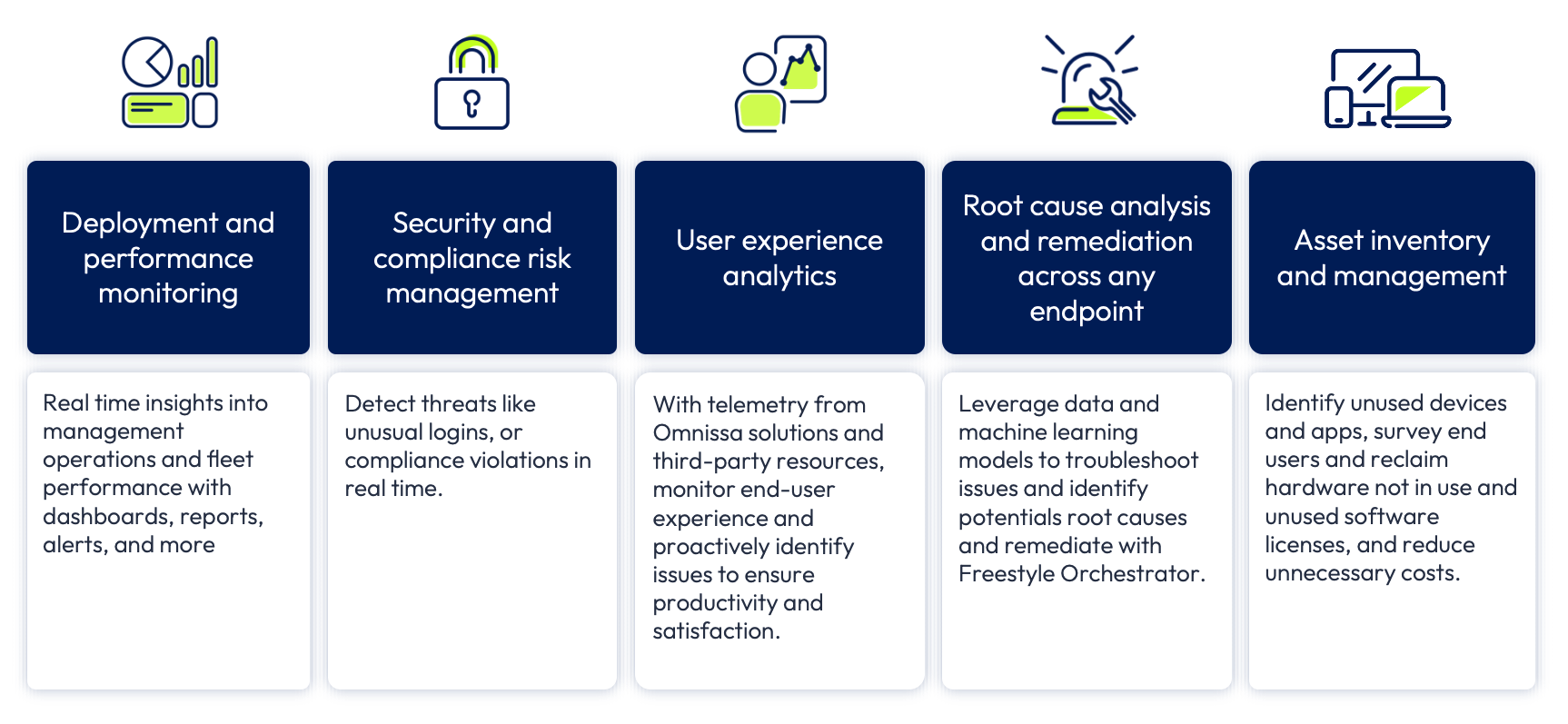 Figure 2: Example Omnissa Intelligence use cases and capabilities
Aggregation
With Omnissa Intelligence, you can track a rich set of metrics, such as device health, boot time, OS stability, app performance, users, and network statistics.
Threat mitigation – Aggregate threat data from external sources via the Workspace ONE Trust Network, analyze risk in-context to your environment and fix with automation
App data normalization – Collect app data from all endpoint types and operating systems to normalize app statistics for a comprehensive view of app performance and adoption to drive data-driven decision making
Correlation
Omnissa Intelligence can gather and analyze data from multiple sources to calculate risk and optimize the end user experience.
Change management – Correlate app or OS crashes with upgrades and patches to proactively address potential large-scale issue. Analyze critical app user flows alongside network insights to understand user experience.
Risk analytics – Correlate and analyze data from a variety of data sources and leverage machine learning to calculate user risk score based on user activity and device context
Automation
Admins can proactively identify issues, troubleshoot, and remediate with automation using Freestyle Orchestrator within Omnissa Intelligence. Freestyle Orchestrator is a low code/no code workflow platform that helps IT admins automate complex business use cases by sequencing tasks based on a trigger. For example, from data gathered about battery health across the device deployment, automate battery procurement and replacement before users experience down time. In addition, admins can automate actions when a user experiences an app or OS crash, such as opening ITSM tickets or sending surveys, to power proactive IT support.
Automation engine – Omnissa Intelligence has a built-in automation engine used to create rules and conditions to take automatic action when issues arise, such as security, efficiency, user experience, and so on. Admins can orchestrate and automate IT workflows based on pre-defined rules and a rich set of parameters. In addition, extend the workflows to third-party tools by utilizing out-of-the-box or custom workflow connectors.
Efficiency and agility – Accelerate IT tasks, issue resolutions, and patch rollouts with a powerful automation engine that spans internal and third-party tools in your environment
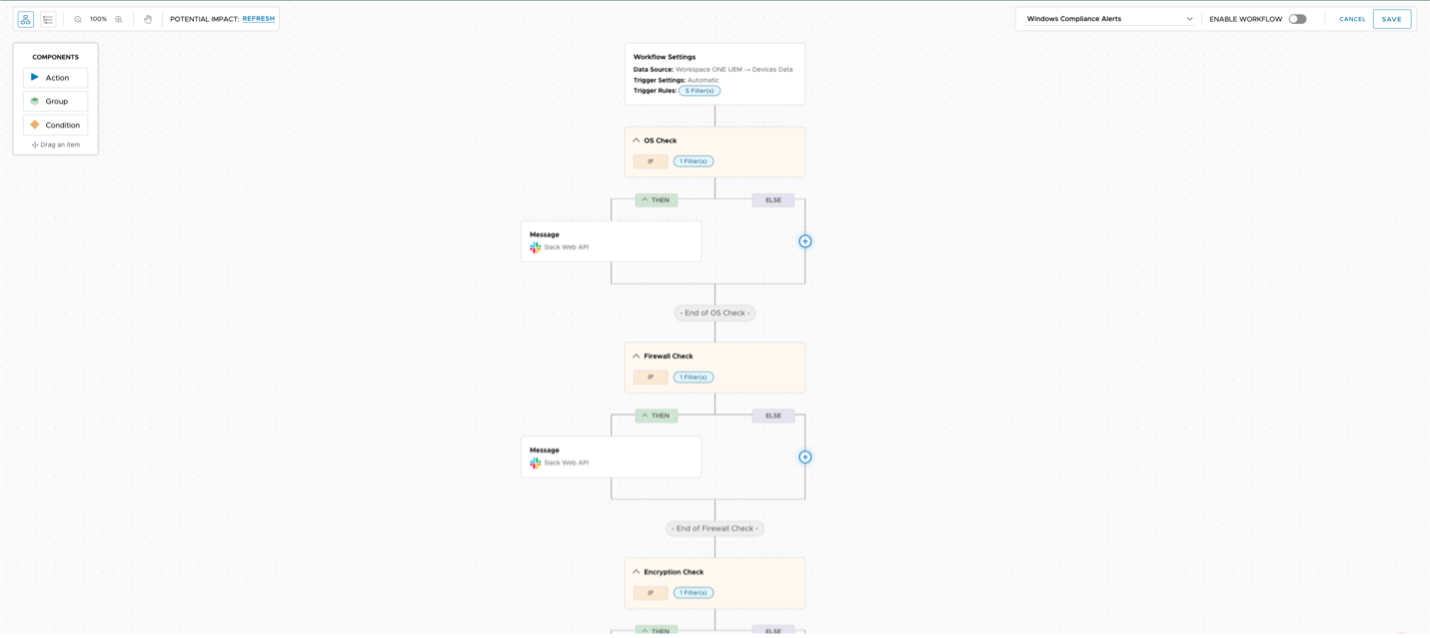
Figure 3: Freestyle Orchestrator workflow example - building automated user alerts when a device is out of compliance
Visualization
Omnissa Intelligence monitors the status of devices, applications, delivery process, workflow, and employee productivity. You don’t get buried in data overload because Intelligence breaks up data into analytics use cases and summarize metrics into contextual dashboards.
Rich visualization – Omnissa Intelligence aggregates and correlates data from multiple sources to give you complete visibility into your entire environment. Date is ingested from multiple sources across your digital workspace to visualize environment KPIs, understand trends and identify issues. With out-of-the-box (OOTB) dashboards and use cases, go from raw data to insights quickly with minimal friction.
App analytics – For example, understand app performance and adoption with mobile app analytics. Analyze critical user flows and network insights to proactively identify and resolve issues. In addition, Software Metering dashboards are provided OOTB to empower data-driven software rationalization and app license optimization decisions.
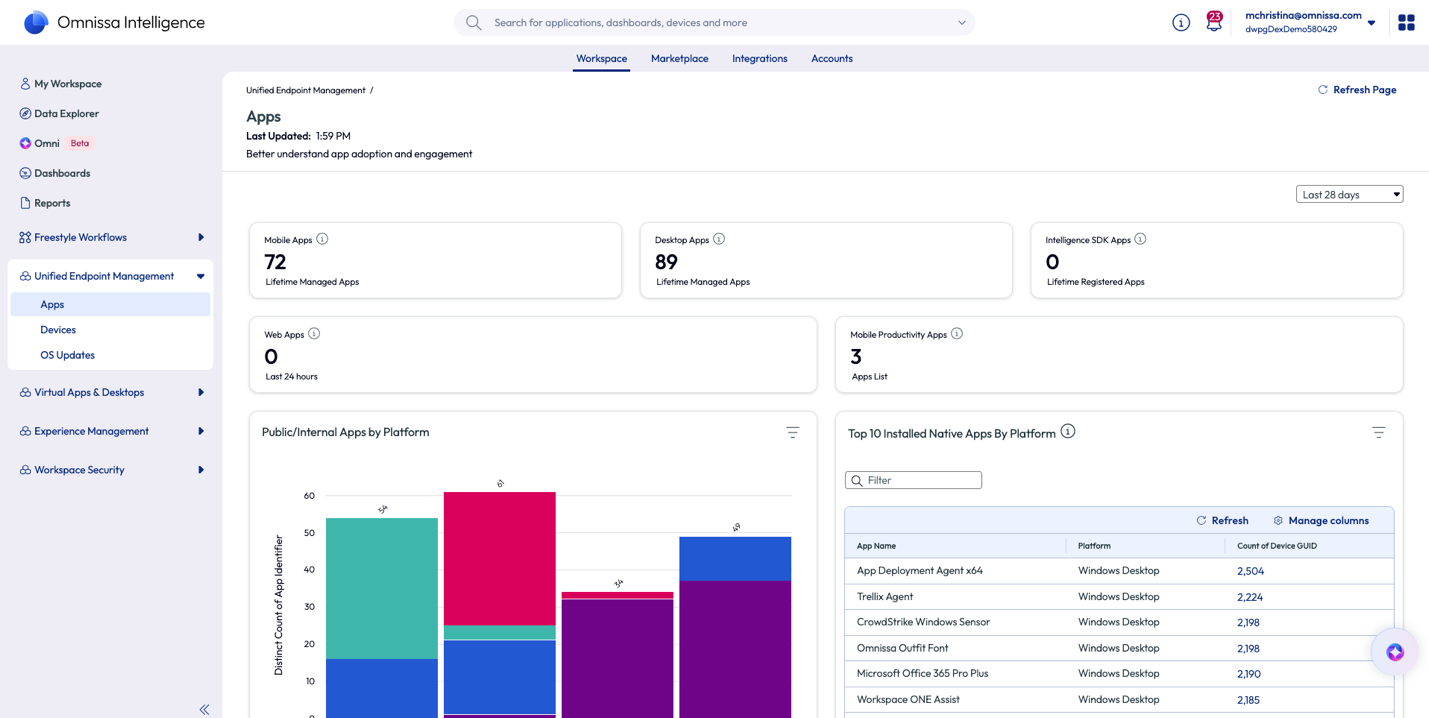 Figure 4: Application deployment overview dashboard
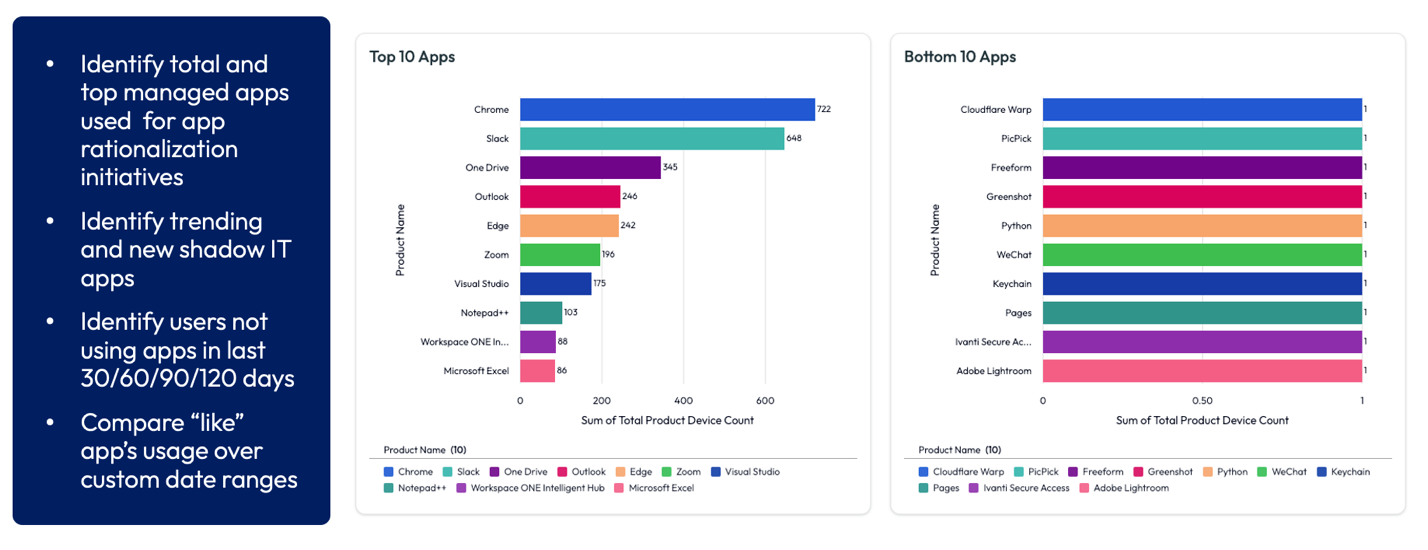 Figure 5: Overview of Software Metering tools in Omnissa Intelligence
Action
Omnissa Intelligence enables the admin to act more efficiently by identifying issues, performing root-cause analysis, and configuring automatic responses.
Data-driven decisions – Omnissa Intelligence produces the insights that enable IT and Security admins to make informed decisions for Workspace ONE and Horizon deployments. Leverage machine-learning models based on a rich set of data points to gain deep insights across your cross-platform digital workspace, including desktop and mobile devices, device OS, applications and users.
Employee productivity – Monitor digital workspace metrics that impact employee experience, proactively identify issues, perform root cause analysis, and quickly provide a fix.
Architecture
Omnissa Intelligence is a cloud-only service provided with the Omnissa Platform, hosted on Amazon Web Services (AWS). Agents located on physical (Workspace ONE UEM managed) and virtual (Omnissa Horizon) devices, and the Omnissa Intelligence SDK embedded in mobile apps, collect telemetry and transmit to Intelligence.
Omnissa Intelligence Components
Omnissa Intelligence aggregates, correlates, and analyzes telemetry from multiple data sources. From this raw data, Intelligence produces reports, dashboards and alerts, providing insights and enabling proactive support and remediation. Using Intelligence, IT admins can automate workflows and leverage AI and machine learning to proactively improve end-user experience, strengthen security risk compliance, and optimize IT operations.
Omnissa Intelligence includes the following high-level components:
- Data sources – Ingest data from Workspace ONE UEM, Omnissa Access, Omnissa Intelligence SDK, Omnissa Horizon, and Workspace ONE Trust Network
- Omnissa Intelligence Connector – Collects and feeds data into the Omnissa Intelligence cloud service (required for on-premises UEM environments only)
- Intelligence Cloud Service – Aggregates data from connectors, generates and schedules reports, and populates the dashboard so data is easily visualized
- Workspace ONE UEM – Provides endpoint analytics from UEM-managed and registered devices
- Omnissa Access – Provides identity analytics based on user and Workspace ONE logins and app loads for apps deployed to the Workspace ONE Intelligent Hub catalog
- Omnissa Intelligence SDK – Provides app analytics for mobile applications, including load numbers, network events, and incident reports
- Omnissa Horizon – Provides experience analytics based on virtual apps and desktops data as part of the Workspace ONE Experience Management solution. This data helps administrators understand the overall experience of the Horizon deployment and act to optimize the user experience.
- Workspace ONE Trust Network – Provides threat data from security solutions including endpoint detection and response (EDR) solutions, mobile threat defense (MTD) solutions, and cloud access security brokers (CASB). This integration provides Omnissa Intelligence admins with insights into the risks of devices and users in the environment. See this article to learn more about Workspace ONE Trust Network.
- Omnissa Marketplace – A library of pre-built dashboards, widgets, reports, workflows, scripts and sensors to get a use case into production quickly
Experience Management
The rich set of integrations provided by Omnissa Intelligence enables the Experience Management workspace that gathers all the necessary objects to address Digital Employee Experience (DEX) use cases into a single area in the Intelligence UI. Tools include widgets and dashboards with related actions, automated workflows, and reports so you can analyze the health of devices, find experience issues with devices and apps, and fix them.
Experience Management provides insights into the employee’s experience with the digital workspace and tools to optimize this experience, such as anomaly detection and guided RCA powered by AI and machine learning. Experience Management provides insights into apps, operating system stability, and device performance. Out-of-the-box dashboards display analytics for key performance indicators that impact employee experiences such as boot time, shutdown time, logon, and logout events.
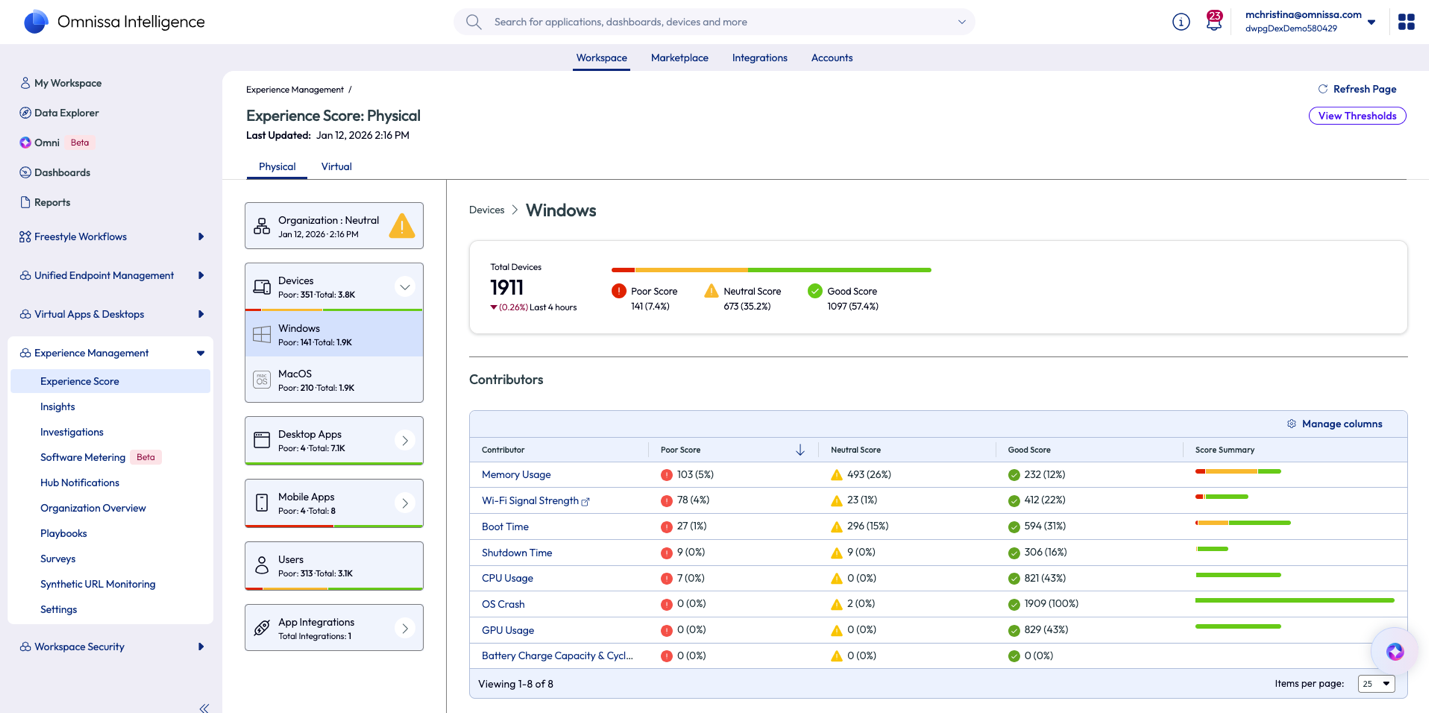
Figure 6: Experience Score dashboard for physical Windows devices in Omnissa Intelligence
Check out these Workspace ONE Experience Management resources:
Where to learn more
Here are some great places to learn more about Omnissa Intelligence: