

Omnissa data flow diagrams
Introduction
This document provides an overview of data movement, processing activities, and information interactions between the Customer and Omnissa cloud hosted systems through a series of data flow diagrams. Data flow diagrams are available for the following cloud services:
- Workspace ONE® UEM™
- Omnissa® Access™, Identity Service, and Workspace ONE® Hub
- Omnissa® Intelligence™
- Workspace ONE® Assist™
- Omnissa® Connect
- Horizon® Cloud Service
Purpose
The purpose of these diagrams is to clearly illustrate how data enters the system, how it is used, where it is stored, and how it flows between the Customer, Omnissa, and third-party sub-processors. Note that the Federal Risk and Authorization Management Program (FedRAMP), on-premises, Omnissa ancillary services, and third-party offerings are not in scope for this document.
Audience
This document is intended for Omnissa commercial cloud administrators. It assumes at least intermediate knowledge of Omnissa cloud services. The diagrams included in this document support both technical and non-technical audiences by presenting operations in a structured, intuitive format and follow standardized notation to ensure consistency, clarity, and ease of interpretation across all audiences. Data definitions and data types are outlined in the next section. Data flows represent logical movement of information, not physical data transfer.
Data definitions and privacy notices
Per the Omnissa General Terms, Customer Content means content uploaded by Customer or any User into a Cloud Service or provided to Omnissa as a part of Support Services. Customer Content does not include account information, Operations Data, Usage Data and Support Request data all of which are processed by Omnissa in its capacity as a data controller. Customer Content may include personally identifiable information (Personal Data) the processing of which is governed by the Omnissa Data Processing Addendum (Omnissa DPA).
Omnissa engages Sub-processors to provide certain services on its behalf that may involve access to Personal Data. Applicable contracting agreements are in place with our Sub-processors to process Personal Data in a manner substantially similar to the standards set forth in the Omnissa DPA, and at a minimum, at the level of data protection required by Data Protection Law. In cloud hosting data centers (such as AWS), Omnissa manages the SaaS environment from the OS-layer up, and Sub-processors providing hosting services do not generally have logical access to Customer Content.
Data types
The following data types are shown in the legend of each diagram below.
Device / user data
This is the information collected by the Omnissa Cloud Services about Users and their devices. Users should be aware that the data collected by each Omnissa Cloud Service depends on how the Customer configures the service. Omnissa acts as a processor for device / user data and it is defined as ‘Customer Content’ in the Omnissa General Terms. A listing of possible data points collected by the Cloud Service can be found in the Workspace ONE Privacy Disclosure.
Configuration data (applicable to Horizon Cloud Service)
Configuration data is the data collected for the purposes of administrative functions and policy management and to assign applications and desktops to users and groups (called “entitlements”). Examples of this include data service generated user ID (UID), Pool & pool group, image names, end user, VM names and so on. A complete list of the data collected or processed can be found in Table 1 below.
Identity / authentication data
We collect personal information directly from our Customers and their Users in connection with their deployment and use of our Services. Identity / authentication data means user profile information (such as usernames and contact details such as email address, job title, user role, company name and phone number) and login credentials (passwords, authentication keys, or security credentials that enable Customer’s access to and management of the Cloud Service). Omnissa usage of identity / authentication data can be found in our Products and Services Privacy Notice.
Application log data (Operations Data) and Usage Data
In connection with your use of the Services, we collect information from our software or systems hosting the Services, and from customer systems, applications and devices that are used to access the Services. Such information is used to facilitate the delivery of the Services to our Customers, including securing, managing and monitoring the Service infrastructure, and providing support (“Operations Data”), and for Omnissa’s own analytics and product improvement purposes, and to optimize the customer’s experience and use of the Services (“Usage Data”). When collecting both Usage Data and Operations Data, we always aim to collect the minimum amount of personal information necessary to fulfil these respective purposes.
Depending on the Service, Operations Data and Usage Data may include the following types of data:
- Configuration data: Technical data about how a customer organization has configured the Services and related environment information. Examples include Service environment information, Service settings, third-party applications and third-party systems used in connection with the Services.
- Online identifiers: Online identifiers such as device and user identifiers and IP addresses.
- Feature usage data: Feature usage data relates to how a customer organization uses the Services. Examples include details about which Service features a customer uses and metrics of user interface activity.
- Performance data: Performance data relates to how the Services are performing. Examples include metrics of the performance and scale of the Services, response times for user interfaces, and details about customer API calls.
- Service logs: Service logs are automatically generated by the Services. Typically, these logs record system events and state during the operation of the Services.
- Support data: Support data is information collected and processed in connection with support facilities such as chat, web form, email, support calls (including recordings of those calls) and Service support tickets.
- Survey data: Survey data relates to surveys or feedback triggered by your use of our Services such as a customer's Net Provider Score ("NPS").
Operations Data may also include such information as:
- Authentication and access information: Information that provides access to the Services, such as username, passwords, and device identifiers.
- Diagnostic information: Diagnostic information may be contained in log files, event files and other trace and diagnostic files.
Omnissa usage of Operations Data and Usage Data can be found in our Products and Services Privacy Notice.
Support request data
This is personal information you provide to us in connection with a support request. You may provide personal information in chats, support calls (including recordings of those calls), Service support tickets or other communications regarding the support request. NOTE: This does not include any files uploaded or attached to a support ticket that are defined as ‘Customer Content’ in our General Terms.
We process Customer Content as a ‘processor’ or ‘service provider’ for the purpose of responding to, troubleshooting and otherwise resolving the support request, in accordance with our General Terms and Data Processing Addendum. Omnissa usage of support request data can be found in our Products and Services Privacy Notice.
Workspace ONE UEM
Workspace ONE UEM service offerings are available in the U.S., Canada, the United Kingdom, the European Economic Area (EEA), and Asia-Pacific (APAC) regions. Workspace ONE UEM deployments are hosted in Amazon Web Services (AWS) or co-located data centers (for a limited number U.S. customers). All Workspace ONE UEM customer production data is replicated to disaster recovery locations in the same region as primary locations. For data processing locations, refer to the sub-processor listing.
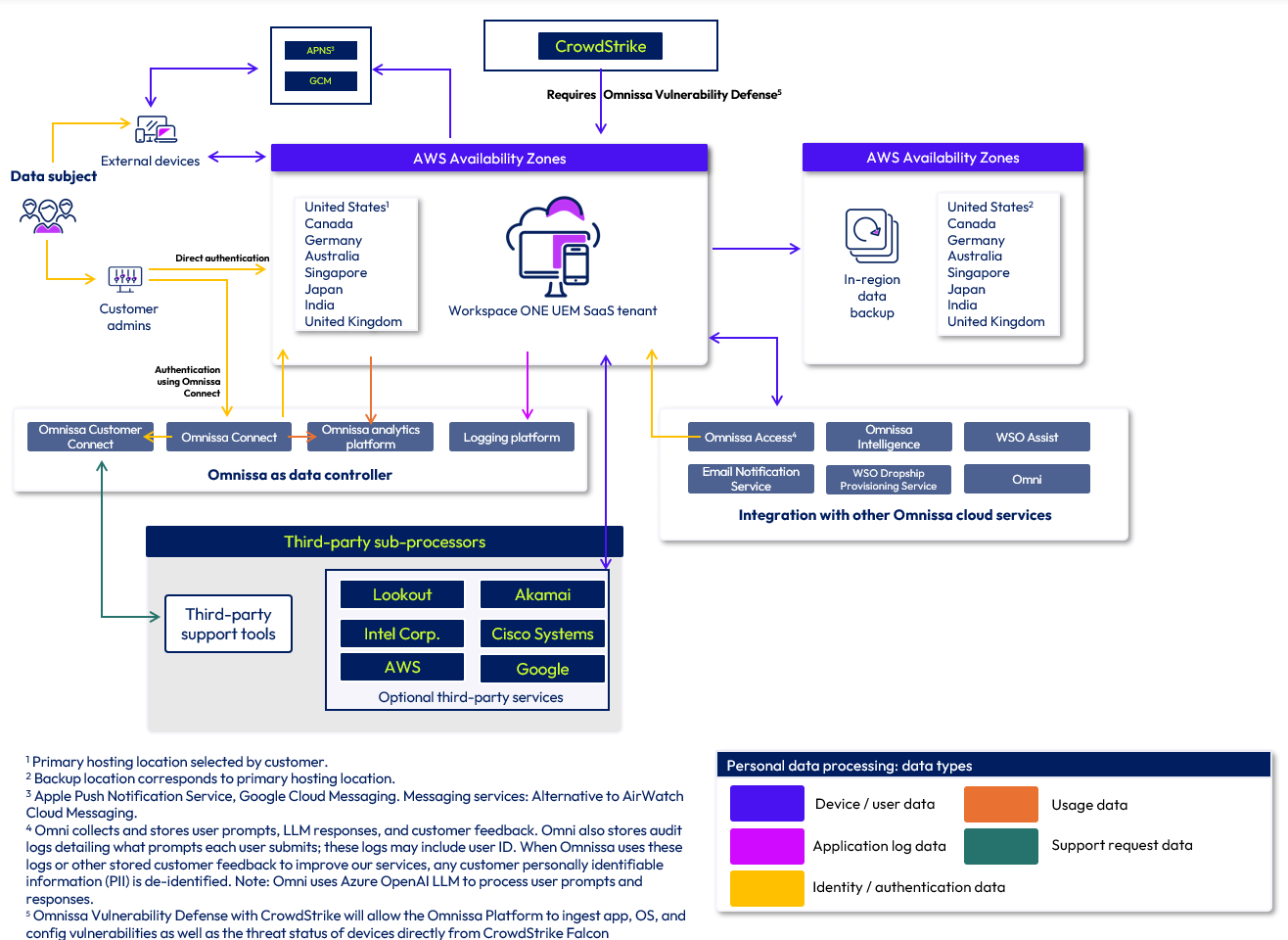
Figure 1: Workspace ONE UEM data flow diagram
Omnissa Access, Identity Service and Workspace ONE Hub Services
Omnissa Access service offerings are hosted and available in the U.S., Canada, United Kingdom, the European Economic Area (EEA), and Asia-Pacific (APAC) regions. The Omnissa Access cloud service infrastructure also hosts Identity Service and Workspace ONE Hub Services functionality. Omnissa Access deployments are hosted in Amazon Web Services (AWS) and disaster recovery is provided using AWS Availability Zones (AZs) within the same region. For data processing locations, refer to the sub-processor listing.
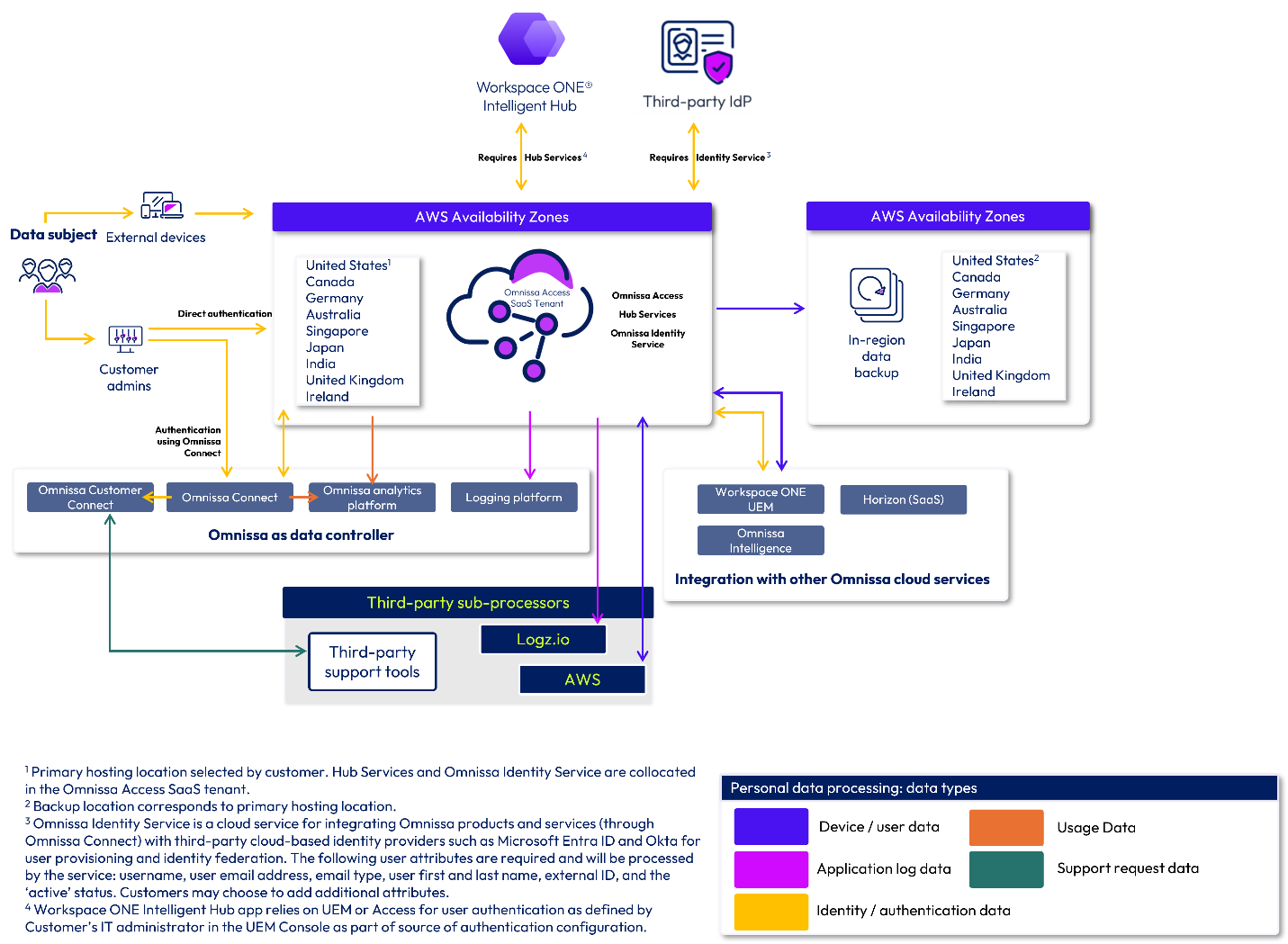
Figure 2: Omnissa Access data flow diagram
Omnissa Intelligence
Omnissa Intelligence service offerings are available in the U.S., Canada, United Kingdom, the European Economic Area (EEA), and Asia-Pacific (APAC) regions. Omnissa Intelligence service infrastructure also hosts Omnissa Intelligence for Consumer Apps and Omnissa Intelligence Digital Employee Experience Management (DEEM). Omnissa Intelligence deployments are hosted in Amazon Web Services (AWS) and disaster recovery is provided using AWS AZs within the same region. For data processing locations, refer to the sub-processor listing.
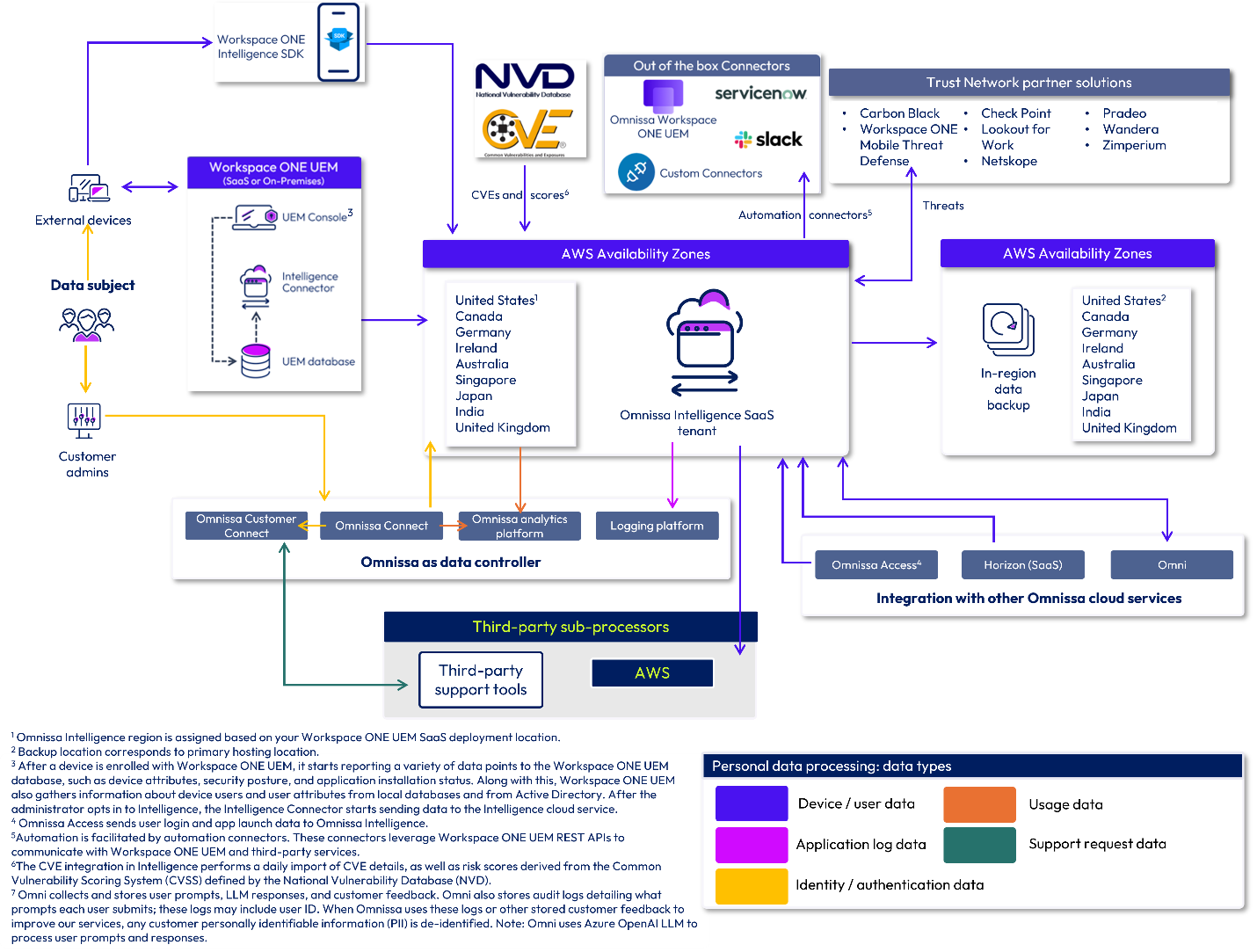
Figure 3: Omnissa Intelligence data flow diagram
Workspace ONE Assist
Omnissa Workspace ONE Assist allows Workspace ONE UEM administrators to remotely access and troubleshoot devices in real time while respecting end-user privacy. Integrating Workspace ONE UEM and Workspace ONE Assist allows your administrators to launch Remote Management sessions for eligible devices directly from the Workspace ONE UEM administration console.
Workspace ONE Assist service offerings are available in the U.S., Canada, United Kingdom, the European Economic Area (EEA), and Asia-Pacific (APAC) regions. Customers can also choose to use satellite servers closest to their end users’ geographies to help deliver low latency remote support sessions. Data may be processed by satellite servers but is not stored.
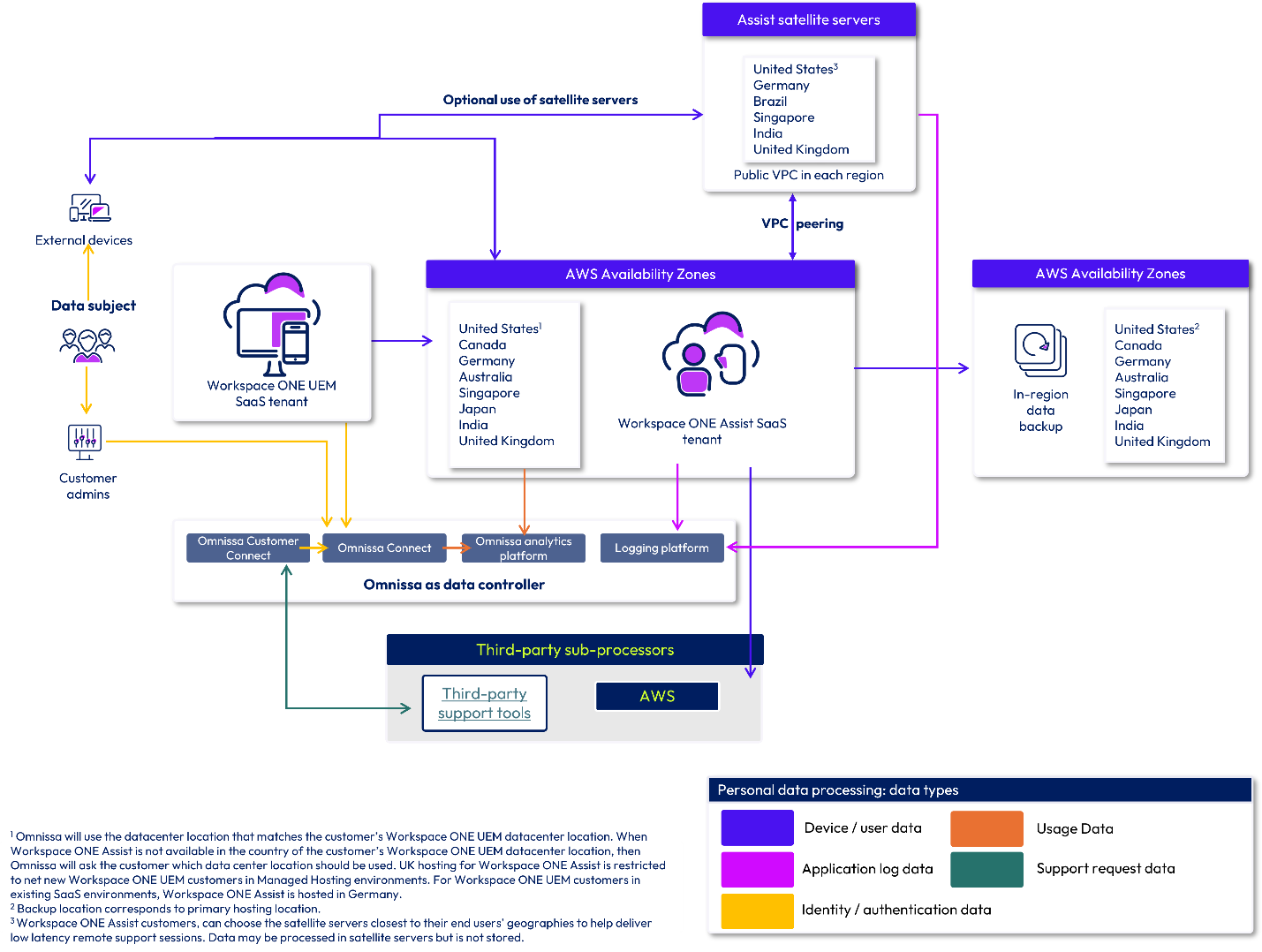
Figure 4: Workspace ONE Assist data flow diagram
Omnissa Connect
Omnissa Connect provides a unified identity and single sign-on system, which is built upon a single platform-based identity. This allows users to access all Omnissa solutions and services using a single set of credentials. Omnissa Connect supports features like role-based access control, multi-factor authentication, and self-service enterprise federation to enhance security. Omnissa Connect also serves as a central management point for Omnissa Cloud Services. It simplifies onboarding and enables customer IT administrators to view and manage their portfolio of Omnissa Cloud Services and Software.
Omnissa Connect is hosted in the United States in Amazon Web Services (AWS) and disaster recovery is provided using AWS AZs within a single region. Omnissa Connect does not process any Customer Content (as defined above); Customer Content remains hosted by the in-scope Cloud Service(s).
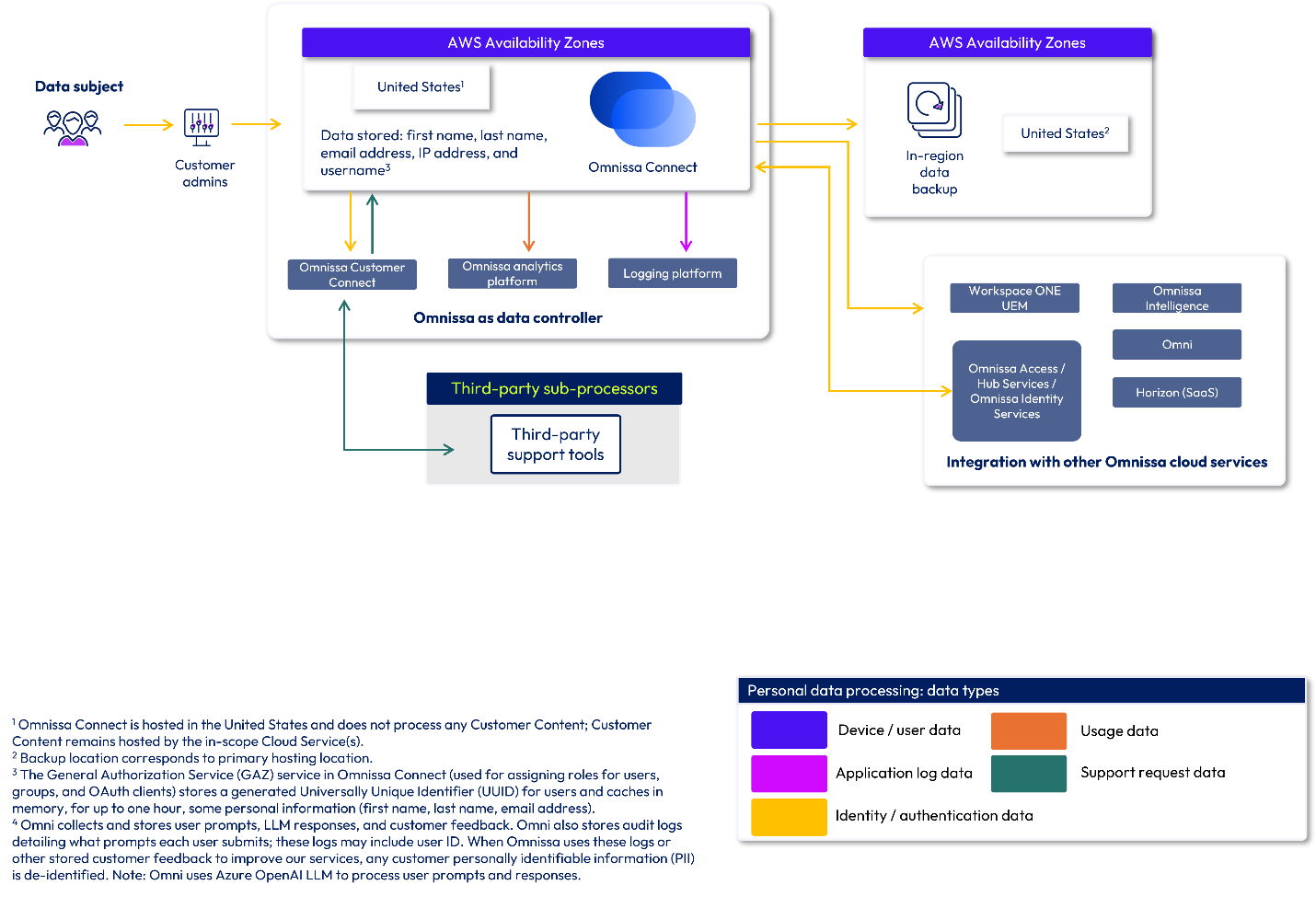
Figure 5: Omnissa Connect data flow diagram
Horizon Cloud
Horizon Cloud is divided into two parts: the Cloud and the Edge. The Cloud components are hosted in Horizon Cloud and the Edge component is hosted in a customer’s infrastructure.
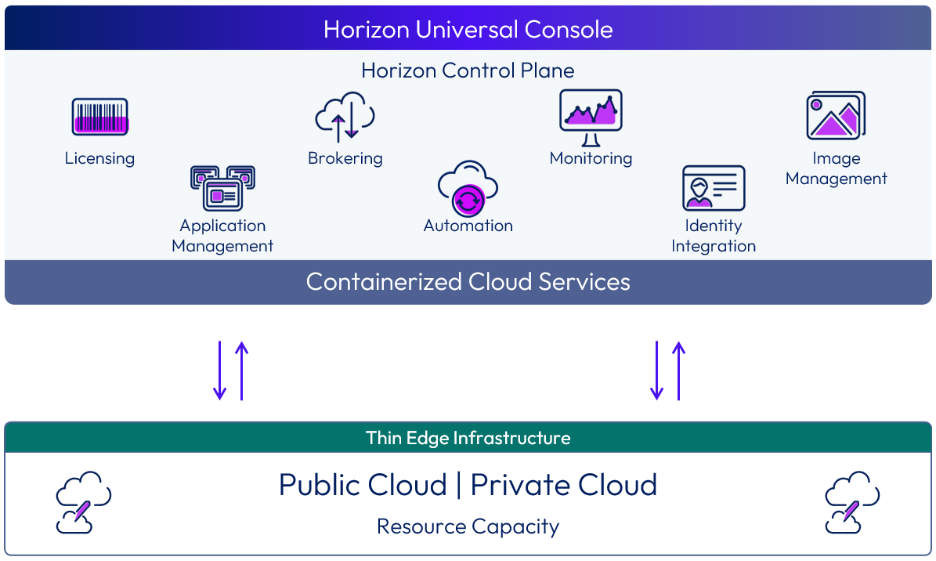
Figure 6: The relationship between the Horizon Control Plane and the Horizon Edge
Horizon Cloud components
Horizon Control Plane
Horizon Control Plane is a multi-tenant cloud service that has been built with security in mind. An organization is paired with only one Horizon Control Plane instance at any time.
The Horizon Control Plane is a distributed, cloud-based control plane that contains the containerized services that deliver Horizon Cloud. It is used for all administrative functions and policy management and to provide user services. The Horizon Control Plane provides the ability to deploy and manage Horizon Edges from a single, centralized user interface. With Horizon Cloud, the Horizon Console, the connection server/brokering function, App Volumes management servers, and associated databases are all included in the Horizon Control Plane.
Control Plane Virtual Machine Hub
Endpoints correspond to regional data shards to help optimize connectivity between the Horizon Agent and Horizon Control Plane. The communication between the Horizon Agent and the Horizon Control Plane Virtual Machine Hub leverages the Message Queuing Telemetry Transport (MQTT) protocol which is encrypted and leverages Azure Private Link for communication (available with Horizon Cloud on Microsoft Azure use case only). For a mapping of VM Hub resources to your originating Azure region, see this article.
Regional data shards
Data shards are deployed across multiple regions and store customer data. Customers choose a single region to store their data upon their first login to the service. This approach not only helps ensure a more secure method of storing customer data but also provides greater levels of scalability. Communications between the regional data shard and CP VM hub are conducted over the MQTT protocol which leverages encryption in transit and at rest.
Horizon resiliency design
Horizon Cloud uses multiple Availability Zones (AZ) for first-line resiliency and high availability. If a primary regional HDC AZ is unavailable, traffic is automatically rerouted to the secondary regional AZ.
In the event of a regional or continental outage, HDC resiliency is designed for cross-geo brokering using an Active-Active setup where any of the brokers in the other geos can broker to any desktop across the globe. This helps to ensure that clients remain connected and continue to receive services without noticeable disruption, even if the primary HDC is temporarily unavailable.
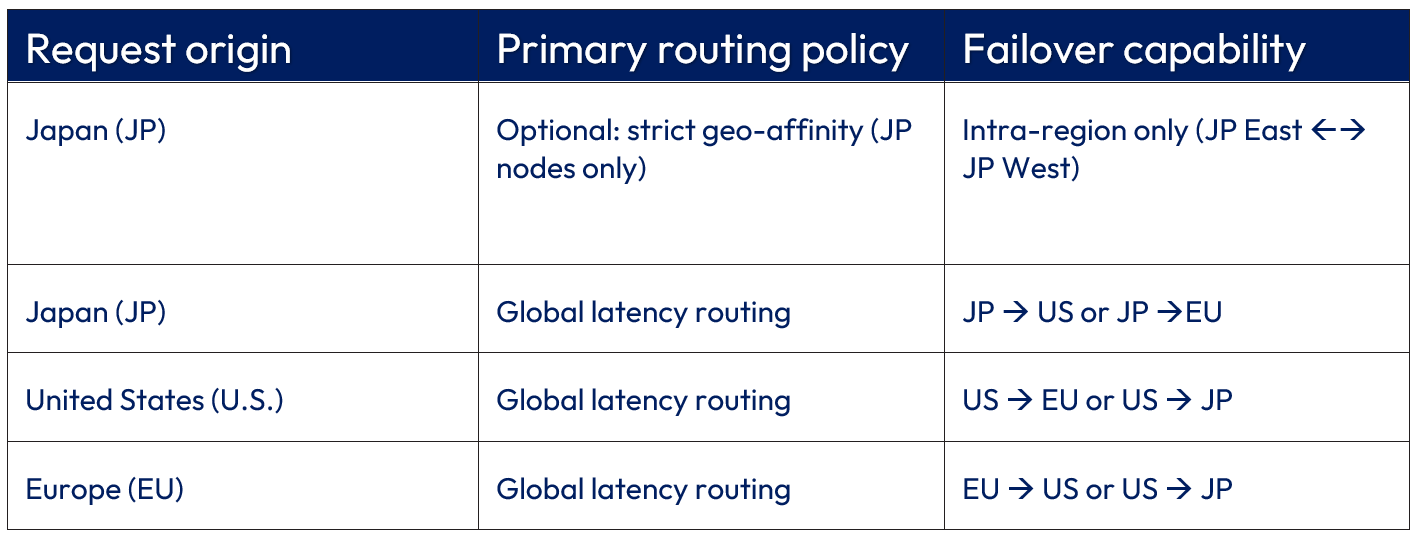
The routing logic differs depending on the origin of the request to balance performance with data sovereignty:
- Global latency routing: In global latency routing, traffic is routed based on the lowest latency to the nearest available global HDC. For instance, a U.S.-based request will typically be processed by a U.S. HDC but may fail over to the EU or JP regions if the primary and secondary nodes are offline. The HDC fail over location is determined by proximity (that is, the end user’s geographic location at the time of login), load, and availability.
- Optional Japan intra-region locality: To meet regional data sovereignty requirements, customers located in Japan have the option to limit traffic to the Japan region only. In this scenario, requests originating from Japan are confined strictly to Japan-based HDCs. Traffic will be load-balanced between the Japan East and Japan West facilities. If the primary regional HDC (for example, Japan East) is unavailable, traffic is automatically rerouted to the secondary regional HDC (for example, Japan West). Using this strict-geo affinity option, Japan-originated traffic will never fail over to U.S. or EU data centers.
Comparison of routing policies
Table 5: Routing policies for HDC failover
Data processing in Horizon Cloud components
The following table describes the data collected or processed by each Horizon Cloud component.
Note that End User data (that is, data created by end users, for example, files, user settings, and user-installed applications) is stored in the VDI desktops, which you deploy and configure. Omnissa has no access to this data.
Table 2: Data processing by component for Horizon Cloud
| Horizon Cloud component | Description | Data processed or stored |
| Horizon Control Plane | In Thin Edge Architecture deployments of the service, the Control Plane Instance (CPI) communicates with regional data shards via API. CPI contains the Horizon Portal which acts as a Broker as well as the Universal Console. The CPI processes the following data elements for the delivery of the service. |
|
| Edge Hub | In Thin Edge Architecture deployments of the service, the Edge Hub resides in the same location as the CPI. The Edge Hub manages Internet of Things (IoT) Hub devices and modules for Horizon Edges. |
|
| Control Plane VM Hub | The Control Plane VM Hub processes data only. |
|
| Regional data shards | The regional data shard is where most customer content that the service leverages is stored. The customer chooses their data shard location upon initial login. The data shard communicates with the Control Plane Instance via API. | Customer Content
Accounts (Azure deployment)
Accounts (AWS deployment)
Accounts (vSphere deployment)
|
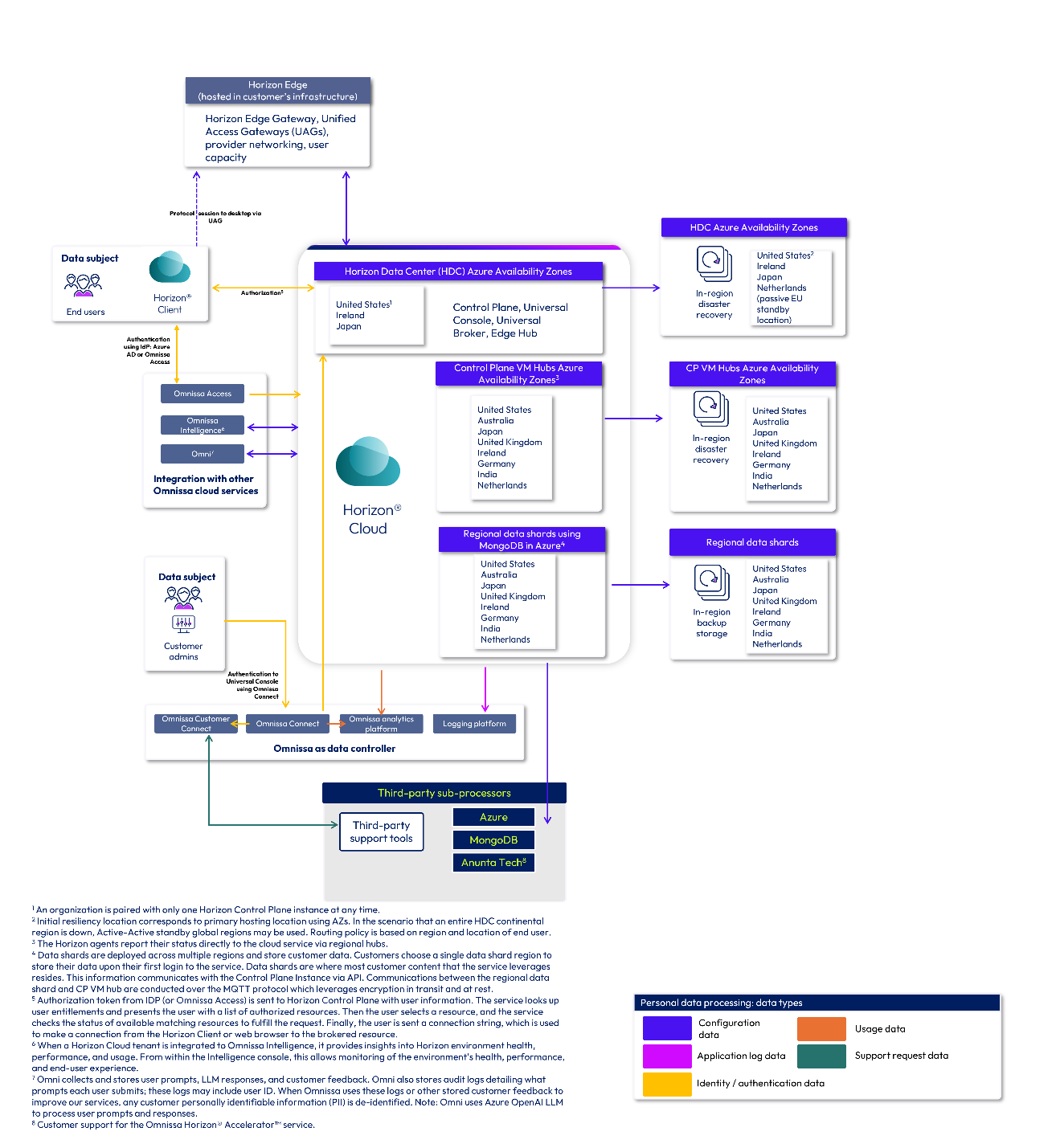
Figure 7: Horizon Cloud data flow diagram
Omni
To help you understand where your data is processed for the Omni, Data Analysis, and Knowledge Search AI tools, we have developed the following data flow diagrams. Whenever possible, Omnissa processes and stores data within your region. For more information on what data may be collected by each tool, see our AI data privacy datasheet.
Omni, Data Analysis, and Knowledge Search are located globally in various regions. The specific data flow is determined by your assigned customer location, the console you are using to access Omni, and the specific type of query you are making (Data Analysis vs. Knowledge Search query). These various data flows are shown in the deployment data flow diagrams below.
Omni data processing locations
Microsoft Azure OpenAI
Omni services use the following Microsoft Azure OpenAI deployment types based on the customer locations:
- US customers: US Data Zone
- EU customers: EU Data Zone
- Customers in other regions: Global
Note: Data is transiently stored in the Azure LLM Endpoint location while processing your request.
Omni, Data Analysis & Knowledge Search
The table below outlines the data processing locations for Omni, Data Analysis, and Knowledge Search.
Table 3: Omni, Data Analysis, and Knowledge Search data processing regions
| Data processing locations | |
| Omni | Omni (hosted in AWS) is available in the following nine (9) regions worldwide:
Depending on what console you are using to access Omni and the tool you are using, data processing may take place outside of your region. See the data flow diagrams below for more information on where your data is processed. |
| Data Analysis | Data Analysis (hosted in AWS) is available in the following nine (9) regions worldwide:
|
| Knowledge Search | Knowledge Search (hosted in Microsoft Azure) is available in three (3) hosting locations worldwide:
|
Omni data flow diagrams
The following diagrams show the data flow for launching the Omni AI assistant from each Omnissa console. Data collected by the Omni AI assistant is stored in the Omni service (in the same region as your assigned customer location) and is processed by Omni, Data Analysis, and Knowledge Search features using AWS and Microsoft Azure as sub-processors.
US deployments
If you are a customer in the United States (US), your data is stored in Omni in the US and is processed within the US.
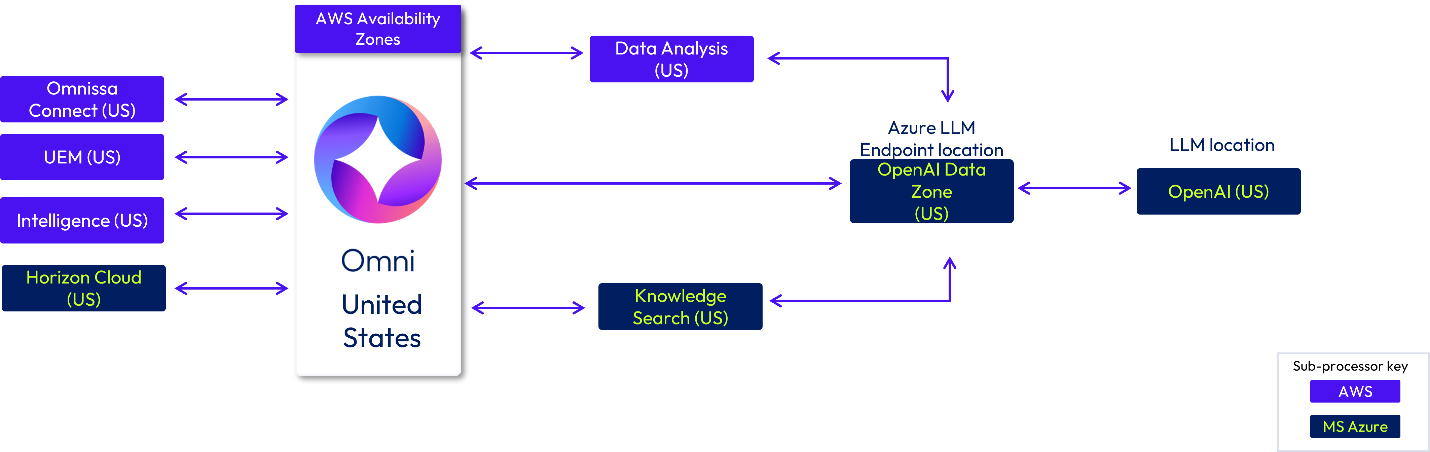
Figure 8: Omni US-based deployment data flow
Canada deployments
If you are a customer in Canada (CA), your data is stored in Omni in Canada. Data may be processed in Omnissa infrastructure located in Canada or the US. The Azure OpenAI LLM Endpoint locations are Canada East (Global) and the OpenAI US Data Zone. The Azure LLM model will use hosting locations worldwide (Global) and in the US.
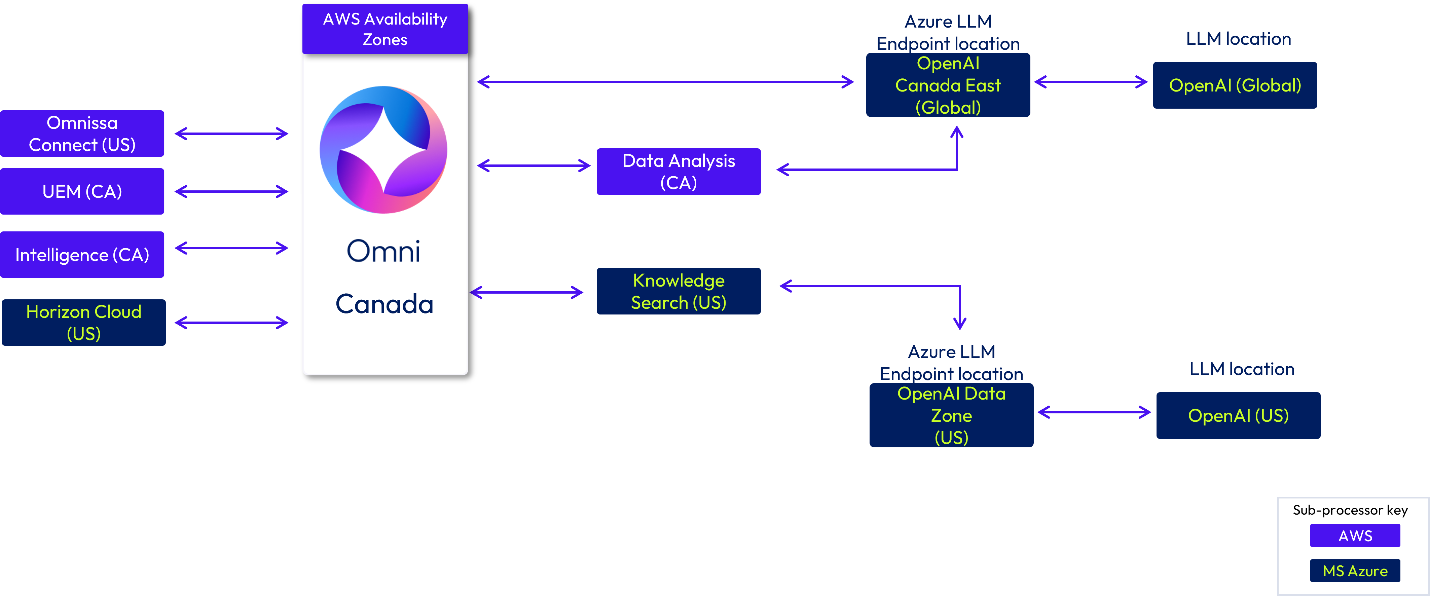
Figure 9: Omni Canada-based deployments
EU deployments
If you are a customer in the European Union (EU), your data is stored in Germany (DE) and is processed within the EU region using locations either in Germany (DE) or Ireland.
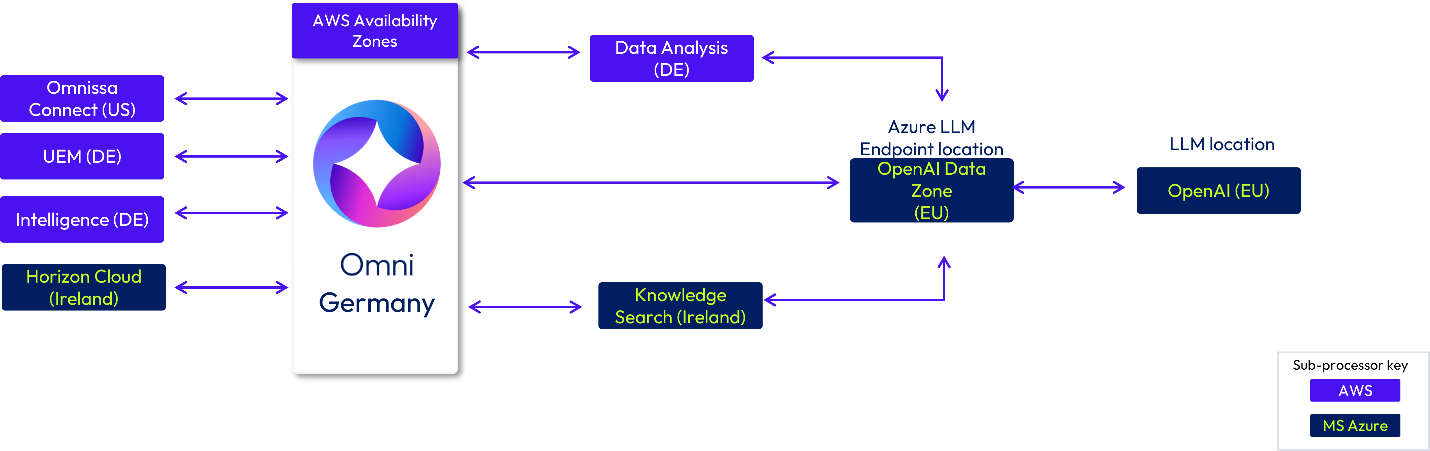
Figure 10: Omni EU-based deployment flow (Germany as assigned customer location)
If you are a customer located in the EU that has selected Ireland as your assigned customer location, your data is stored in Omni in Ireland and is processed in Ireland and the EU.
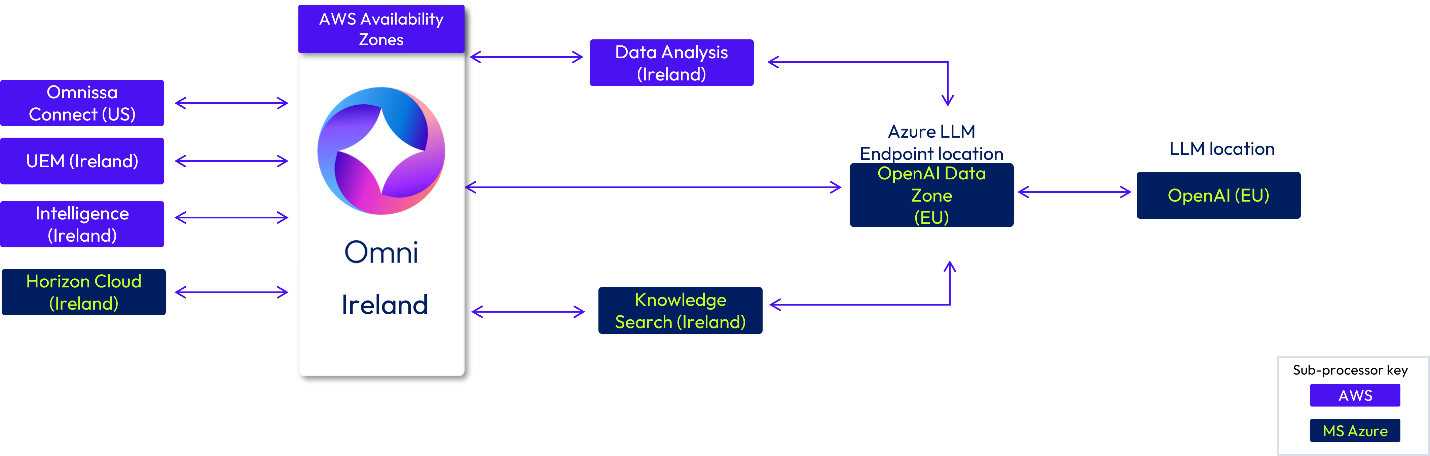
Figure 11: Omni EU-based deployment flow (Ireland as assigned customer location)
UK deployments
If you are a customer in the United Kingdom (UK), your data is stored in Omni in the UK. Data may be processed in Omnissa hosting infrastructure in the UK or Ireland. Azure Open AI LLM Endpoints are located in UK South (Global) and the EU Data Zone. The Azure LLM model will use hosting locations worldwide (Global) and in the EU.
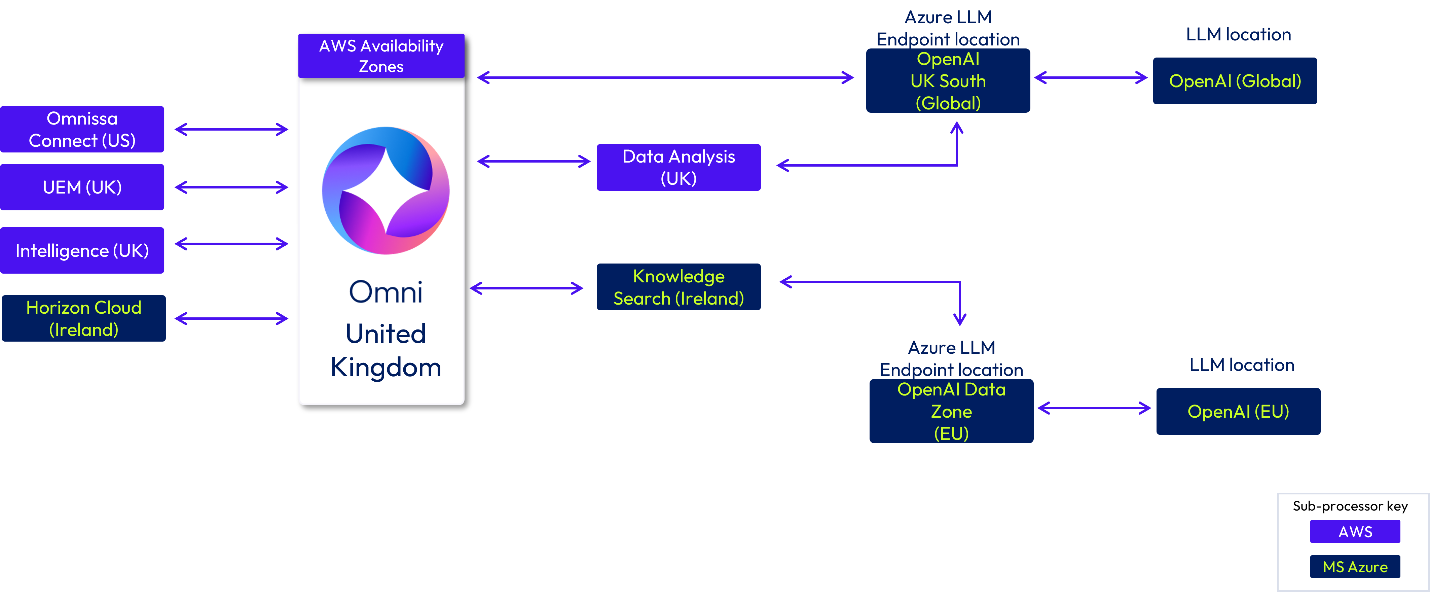
Figure 12: Omni UK deployment data flow
Australia deployments
If you are a customer in Australia, your data is stored in Omni in Australia. Data may be processed in Omnissa hosting infrastructure in Australia or Japan. Azure OpenAI LLM Endpoints are located in Australia East (Global) and Japan East (Global). The Azure LLM model will use hosting locations worldwide (Global).
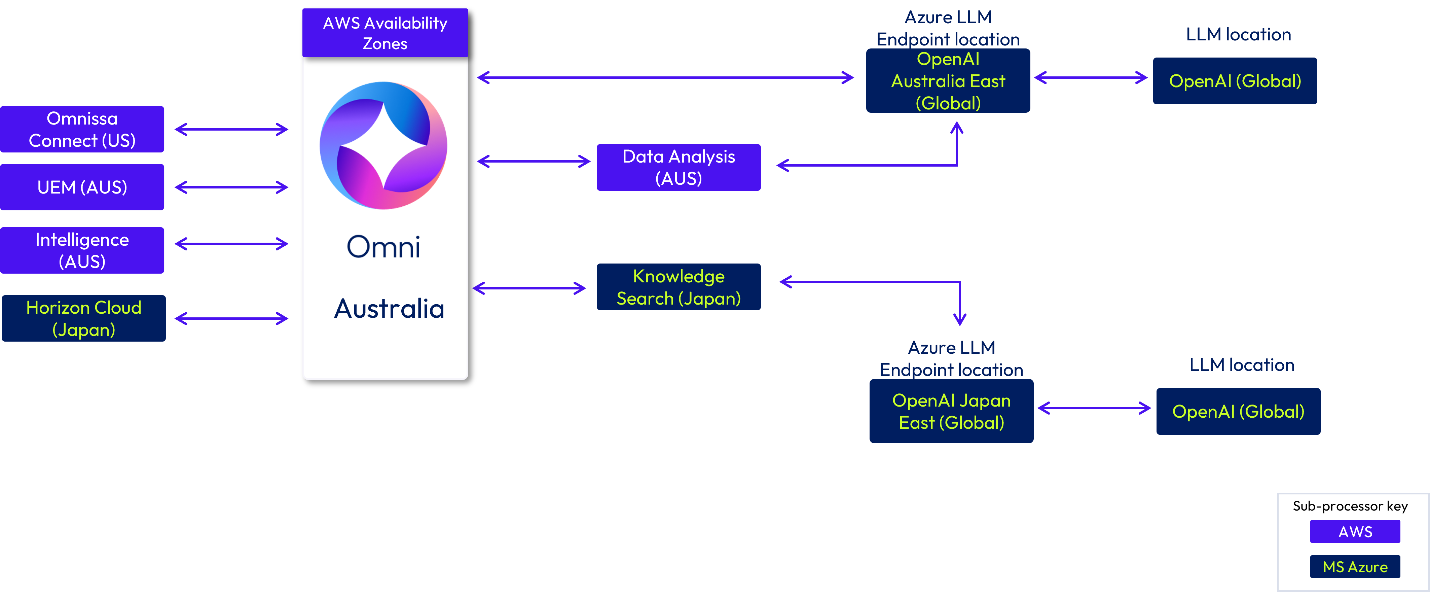
Figure 13: Omni Australia deployment data flow
Japan deployments
If you are a customer in Japan, your data is stored in Omni in Japan and may be processed in Omnissa infrastructure locations in Japan. Azure OpenAI LLM Endpoints are located in Japan East (Global). The Azure LLM model will use hosting locations worldwide (Global).
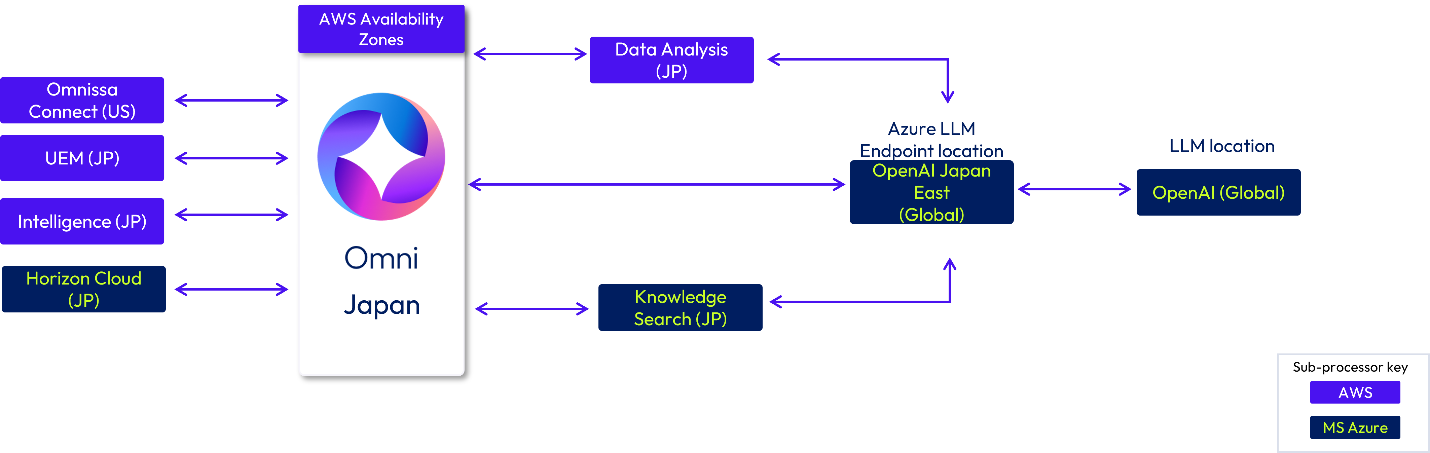
Figure 14: Omni Japan deployment flow
India deployments
If you are a customer in India, your data is stored in Omni in India. Data may be processed in Omnissa infrastructure in India or Japan. Azure Open AI LLM Endpoints are located in South India (Global) and Japan East (Global). The Azure LLM model will use hosting locations worldwide (Global).
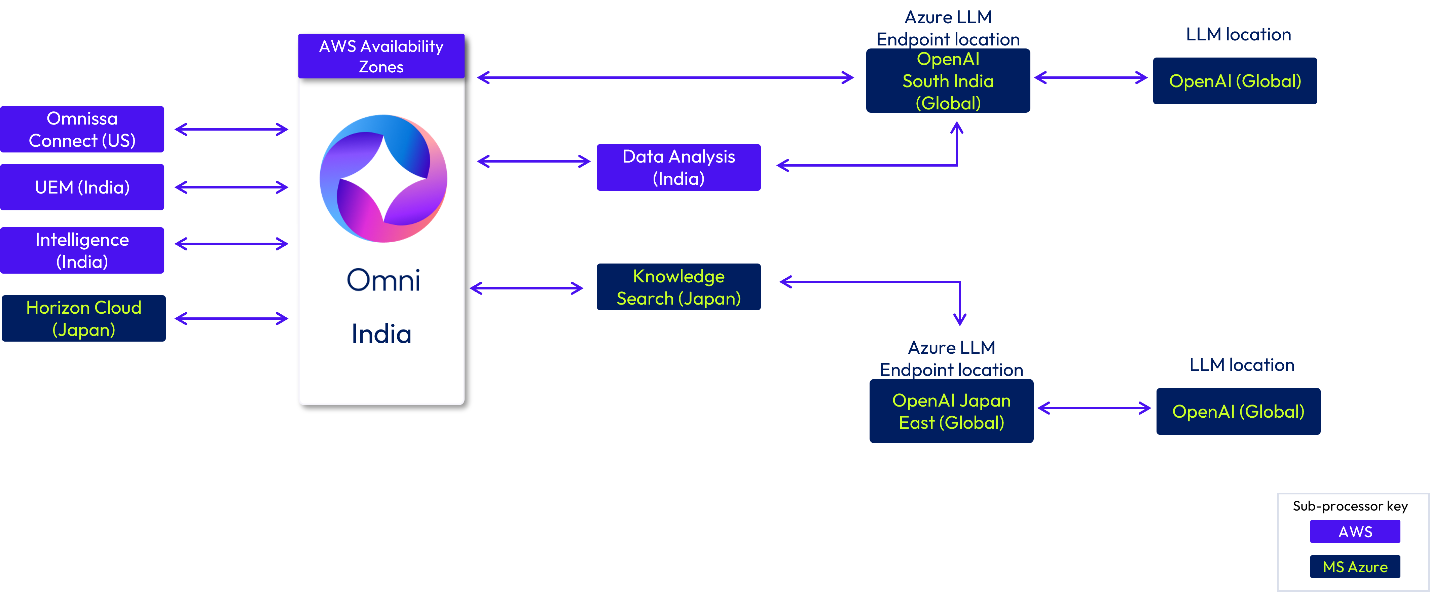
Figure 15: Omni India deployment flow
Singapore deployments
If you are a customer in Singapore (SG), your data is stored in Omni in Singapore. Data may be processed in Omnissa infrastructure in Singapore or Japan. Azure Open AI LLM Endpoints are located in South India (Global) and Japan East (Global). The Azure LLM model will use hosting locations worldwide (Global).
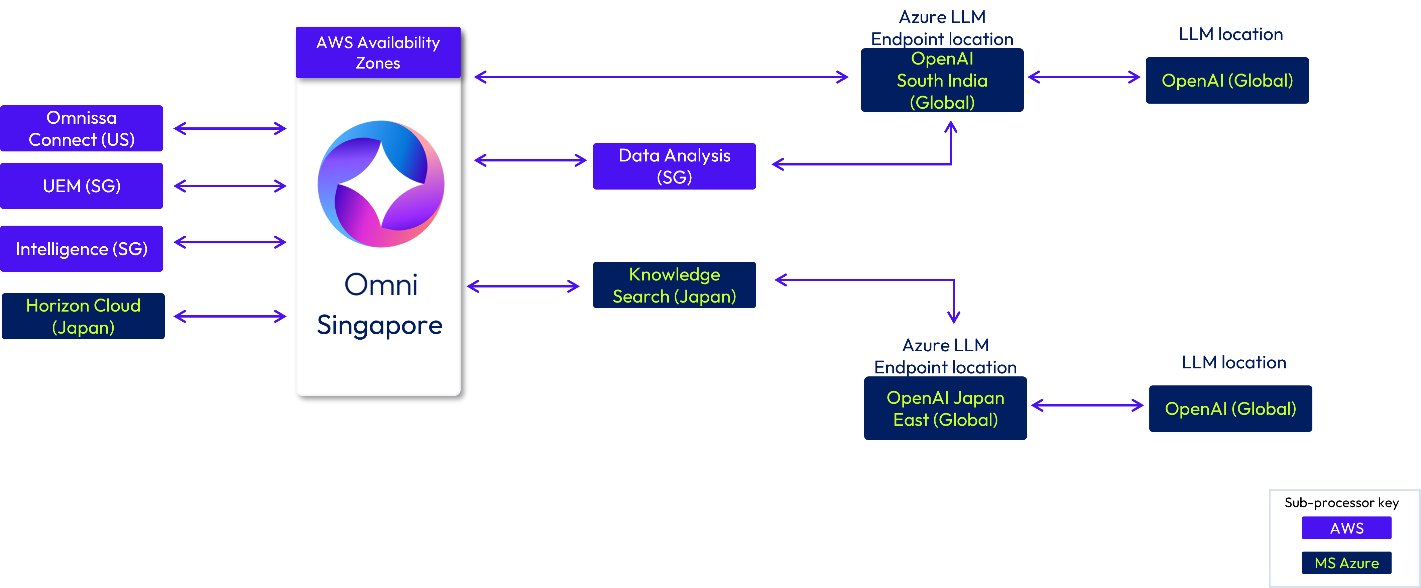
Figure 16: Omni Singapore deployment data flow
Summary and additional resources
This document provides a general overview of data movement withing in Omnissa commercial cloud offerings. The intent is to provide readers with an understanding of what data is collected by the services, where data is stored, and what sub-processors are used.
Additional resources
For more information about Workspace ONE cloud services, you can explore the following resources:
- Workspace ONE cloud security whitepaper
- Workspace ONE UEM Architecture
- Omnissa Access Architecture
- Omnissa Intelligence Architecture
Changelog
The following updates were made to this guide:
| Date | Description of Changes |
|
|
|
| February 24, 2026 |
|
| February 2, 2026 |
|
About the author and contributors
The following people contributed their knowledge and assistance with this document:
- Andrea Smith, Sr. Information Security Analyst, Customer Security Assurance