

Load Balancing Unified Access Gateway for Horizon Cloud
Overview
Omnissa Horizon® Cloud uses Unified Access Gateway™ (UAG) appliances to proxy and manage client connections. When deploying multiple UAG appliances for high availability, an external load balancer is required to distribute sessions across them.
On Private Datacenter Edge providers, UAG appliances are provisioned through the Horizon Universal Console — but the load balancer is a customer provided configuration. Before configuring your UAG deployment, an external load balancer must already be deployed and configured in your environment. This guide describes how to configure that load balancer correctly.
This guide applies to the following deployments:
- vSphere Edge deployments. For more information, see Create a UAG Deployment for a vSphere Edge.
- OpenStack Edge deployments (Advanced deployment is available as of service release 2604; existing OpenStack UAG deployments cannot be converted from Basic to Advanced) For more information, see Create the Unified Access Gateway (UAG) for the Horizon Cloud on OpenStack Edge
Each UAG appliance is configured with at least one dedicated DMZ NIC as the load balancer-facing interface for inbound client traffic. Each appliance supports up to 2,000 concurrent sessions.
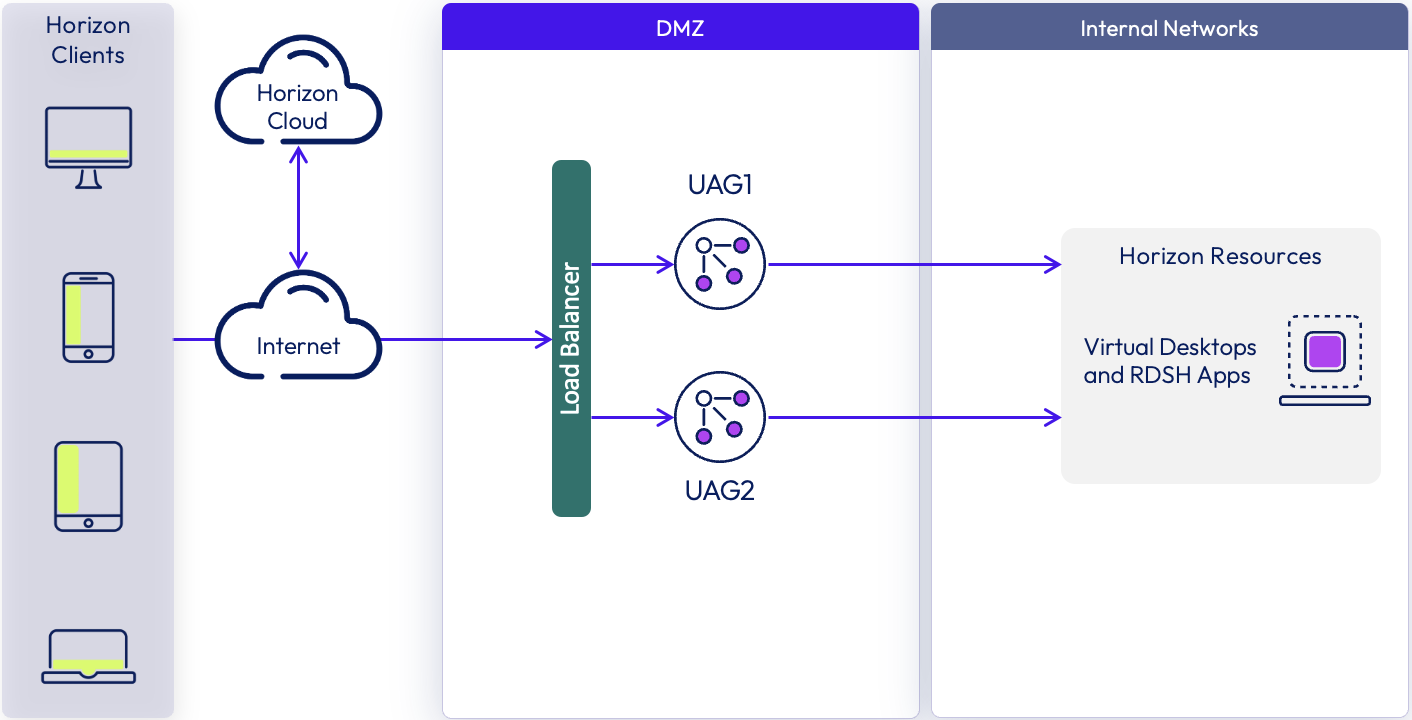
Figure 1: Unified Access Gateway for Horizon Cloud logical architecture
Client Connection Flow
In Horizon Cloud, user authentication and session brokering are handled directly by the Horizon Cloud control plane — this traffic does not pass through the load balancer or Unified Access Gateway. The Horizon Client connects to the Horizon Cloud service (cloud.omnissahorizon.com) over HTTPS to authenticate via the configured Identity Provider. Once authenticated, the Horizon Cloud service resolves the user's entitlements and provides the client with a connection string directing it to the load balancer address for the UAG deployment. For more information, see Horizon Cloud Reference Architecture.
After receiving the connection string from the Horizon Cloud service, the Horizon Client connects to the load balancer’s FQDN or virtual IP address (VIP), which forwards the session to an available Unified Access Gateway.
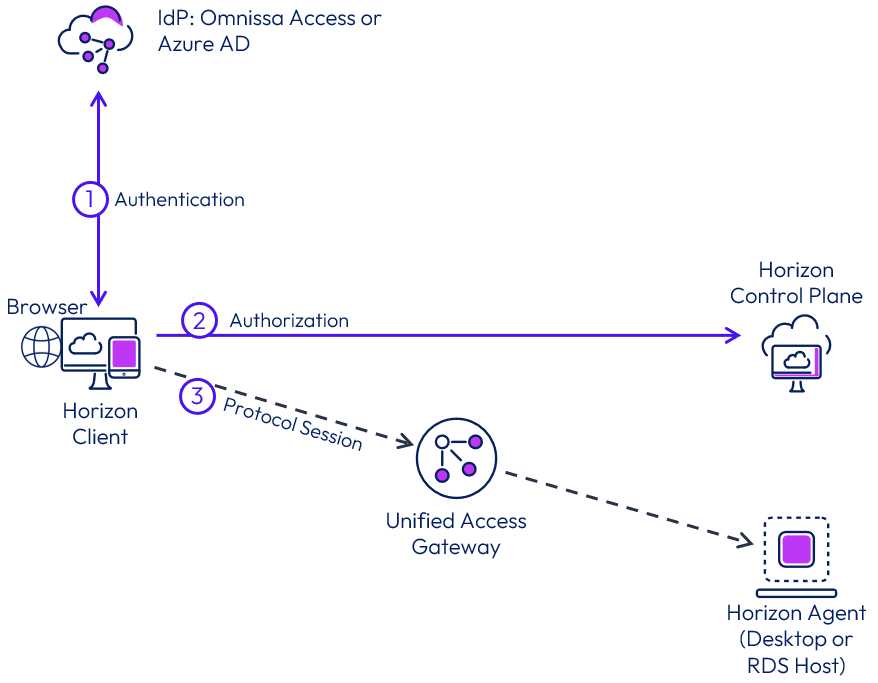
Figure 2: Client connection flow
Load Balancing Deployment Types
Horizon Cloud deployments support two UAG load balancing deployment types, both selected during UAG deployment in the Horizon Universal Console.
In both deployment types, the load balancer must be configured for SSL/TLS passthrough. The TLS certificate presented to clients is provided through the Edge configuration in the Horizon Universal Console and applied to each UAG appliance; the load balancer forwards encrypted traffic directly to the UAG without terminating the TLS session.
Configure the load balancer idle and connection timeouts to exceed the maximum configured Horizon session duration to prevent in-session disconnections.
Configure the load balancer virtual IP to accept connections on the following ports:
- TCP 8443 or TCP 443 — Blast Extreme display traffic (matching the port selected at Horizon Edge deployment time)
- UDP 8443 or UDP 443 — Blast Extreme adaptive transport (recommended for improved performance over high-latency or lossy connections)
Basic deployment - source IP affinity
This is the simplest load balancer configuration, using a single virtual IP address (VIP) with source IP affinity to route all session traffic from a given Horizon Client to the same Unified Access Gateway appliance.
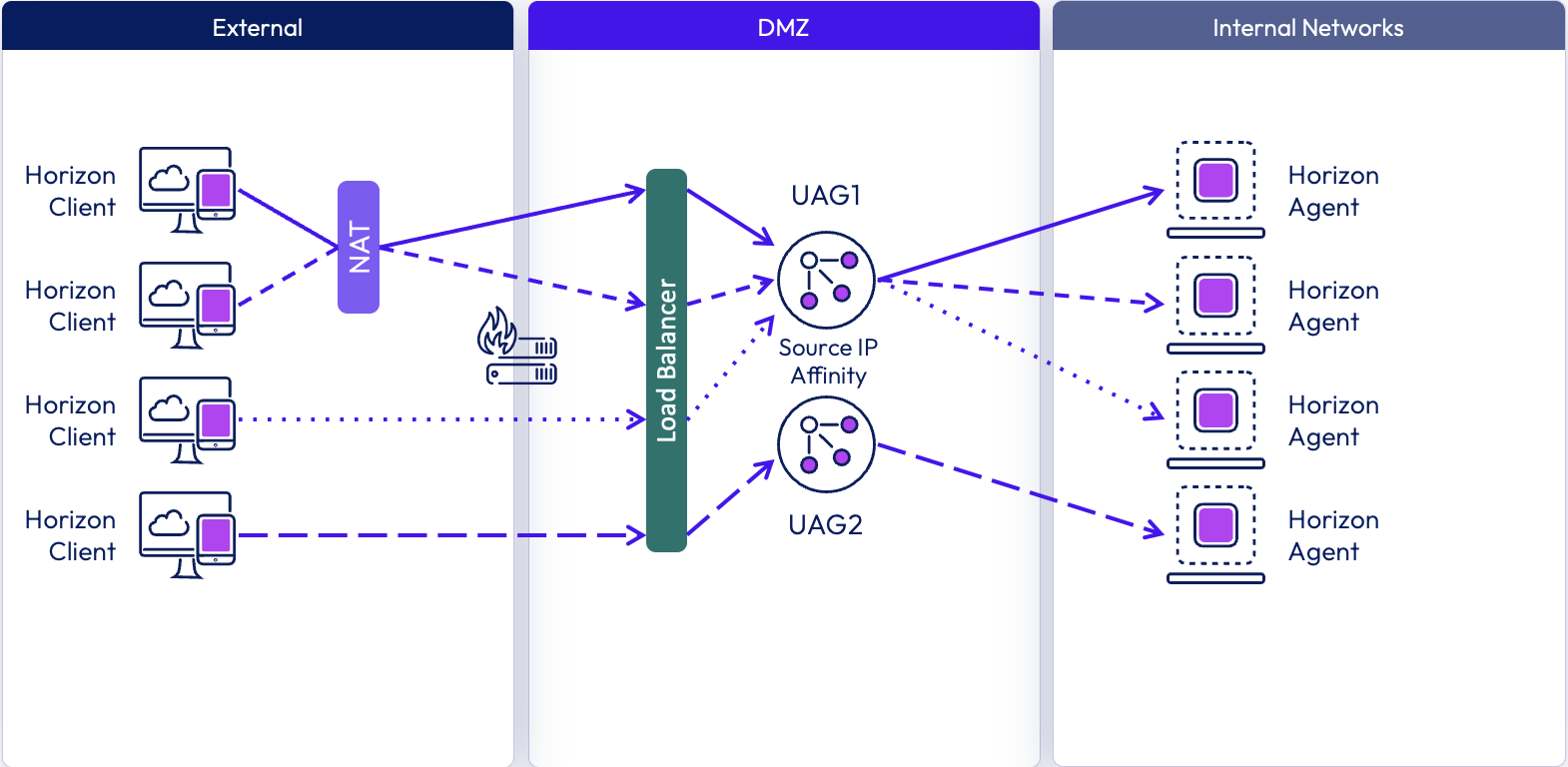
Figure 3: Basic Deployment – Source IP Affinity – Blast Session Distribution
Basic deployment advantages:
- Supported on all Private Datacenter Edge providers.
- Source IP affinity ensures all traffic from a given client routes to the same UAG, simplifying session-level diagnostics and log correlation.
Basic deployment disadvantages:
- Relies on source IP address affinity which is not always possible.
- Clients behind a NAT Gateway may get routed to the same UAG.
Basic deployment is recommended for all environments where source IP address affinity is reliable. Select Basic when configuring the UAG deployment in the Horizon Universal Console. If clients connect through a proxy or NAT device where source IP affinity is not reliable, use Advanced deployment instead.
Advanced deployment - round-robin
Advanced deployment is a load balancing configuration that eliminates the need for source IP affinity. UAG Cluster connectivity over port 8445, enables session recovery through any available UAG appliance — allowing Blast connections to be distributed across all UAGs using round-robin load balancing. In this configuration, the load balancer does not need to maintain session affinity — any healthy UAG instance can accept any client session.
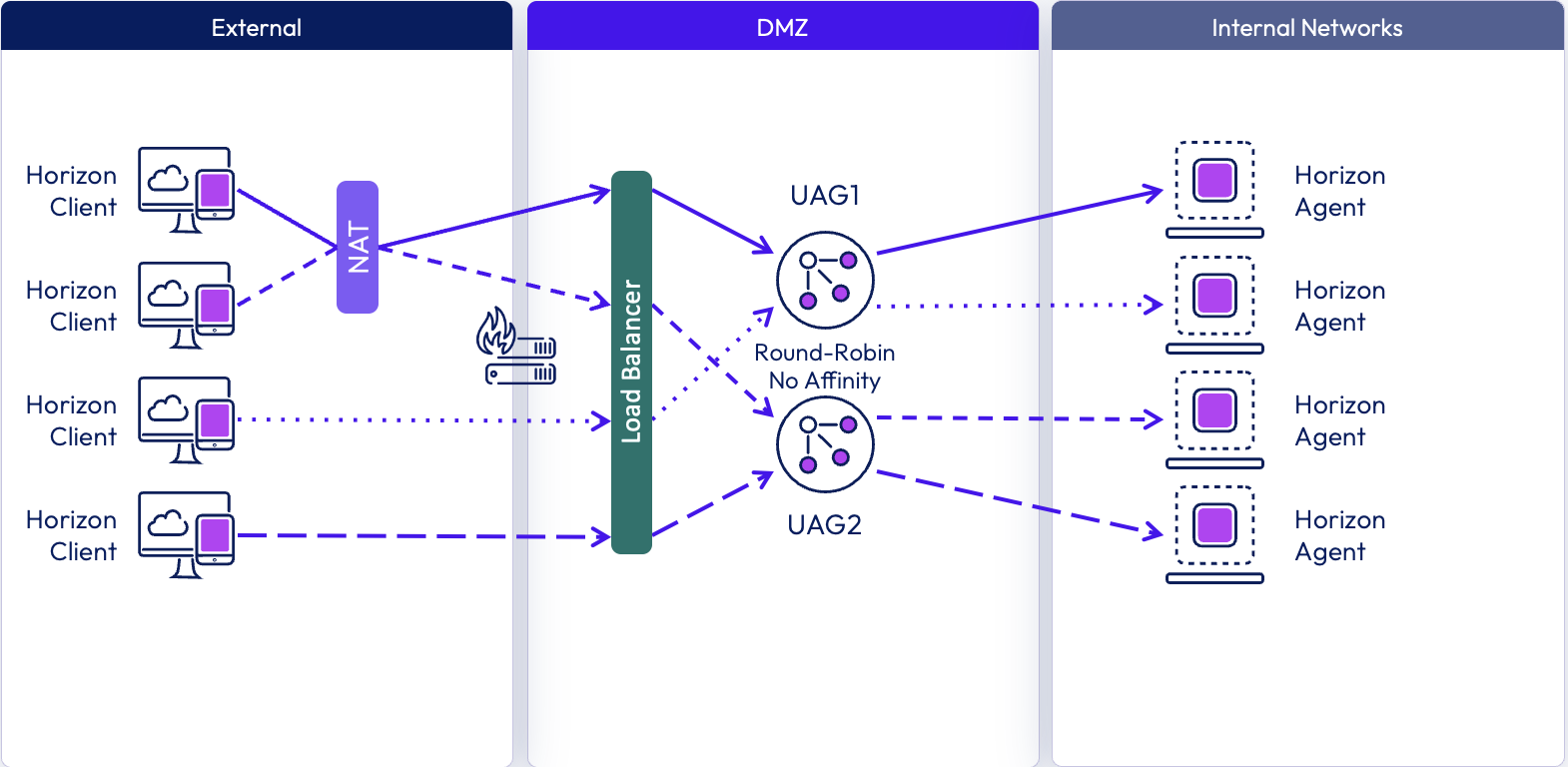
Figure 4: Advanced Deployment - Round Robin – No Affinity – Blast Protocol Distribution
Advanced deployment has the following requirements:
- If not already using a 3-NIC UAG, you must configure 3 networks with static IP ranges before enabling Advanced deployment.
- All end point devices must be running Horizon Client version 24.12 or above.
- Port 8445 must be open between each UAG VM over the management network. For more information, see Port and Protocol Requirements for Deploying a vSphere Edge.
To configure Advanced deployment, select Advanced when setting up the UAG deployment in the Horizon Universal Console, then configure the load balancer virtual server for port 8443 (or 443 if your Horizon Edge Gateway was deployed with Blast on port 443) to use round-robin distribution with no session affinity.
Make sure that Source IP affinity and cookie-based affinity on the Load Balancers are disabled when using Advanced deployment.
Advanced deployment advantages:
- Does not rely on source IP affinity.
- Provides true load distribution across all UAG appliances.
- Simpler load balancer configuration — no affinity rules or session persistence required.
Health monitoring
Configure the load balancer to perform health checks by sending an HTTPS GET request to /favicon.ico on each UAG appliance (for example, https://uag1.myco-dmz.com/favicon.ico). A response of HTTP 200 OK indicates the appliance is healthy and available to accept connections. Any other response, or no response, should cause the load balancer to mark that appliance as unavailable and stop routing new sessions to it. A 30-second polling interval is recommended. For more information, see Load Balancing for Omnissa Horizon.
Unified Access Gateway can be placed into quiesce mode, after which it responds with HTTP 503 instead of 200 to the health check, signaling the load balancer to stop routing new sessions to that appliance. Existing sessions continue until the user disconnects or the maximum session time is reached. The appliance is then available for maintenance after a maximum of the overall session timer, which is typically 10 hours. This is the recommended approach for taking a UAG appliance offline for maintenance in a Horizon Cloud environment.
Summary and additional resources
Additional resources
For more information about Omnissa Unified Access Gateway, you can explore the following resources:
- Unified Access Gateway documentation
- Network ports in Horizon Cloud
- Add and Deploy a Horizon Edge for vSphere
- Create a UAG Deployment for a vSphere
- Add and Deploy a Horizon Edge for OpenStack
- Create the Unified Access Gateway (UAG) for the Horizon Cloud on OpenStack Edge
Changelog
The following updates were made to this guide:
| Date | Description of Changes |
| 2026-05-20 |
|
About the author and contributors
The content in this document was authored by :
- John Kramer, Senior Staff Product Specialist, Omnissa
- Graeme Gordon, Senior Staff Architect, Omnissa
- Rick Terlep, Director, Product Specialist, Omnissa
Feedback
Your feedback is valuable. To comment on this paper, either use the feedback button or contact us at tech_content_feedback@omnissa.com